
Shared Browser
One real Chromium session per Paseo workspace, shared live across every connected client.

Shared Browser
A Paseo plugin that runs one real Chromium browser per workspace on the daemon host and shares that
exact live session with every connected Paseo client. Version 1.0 replaces the previous browser
runtime in place with a plugin-owned, pinned agent-browser runtime; existing installations keep
the shared-browser plugin ID and upgrade without installing a second plugin.
This is not URL synchronization and not a second browser with copied cookies. Every viewer and eligible workspace agent acts on the same running page, DOM, navigation state, and login state. Many viewers can watch; human control remains server-authoritative and takes priority over agent input.
Demo
https://github.com/user-attachments/assets/37d09fff-0750-440d-983d-426150b0724d
Screenshots
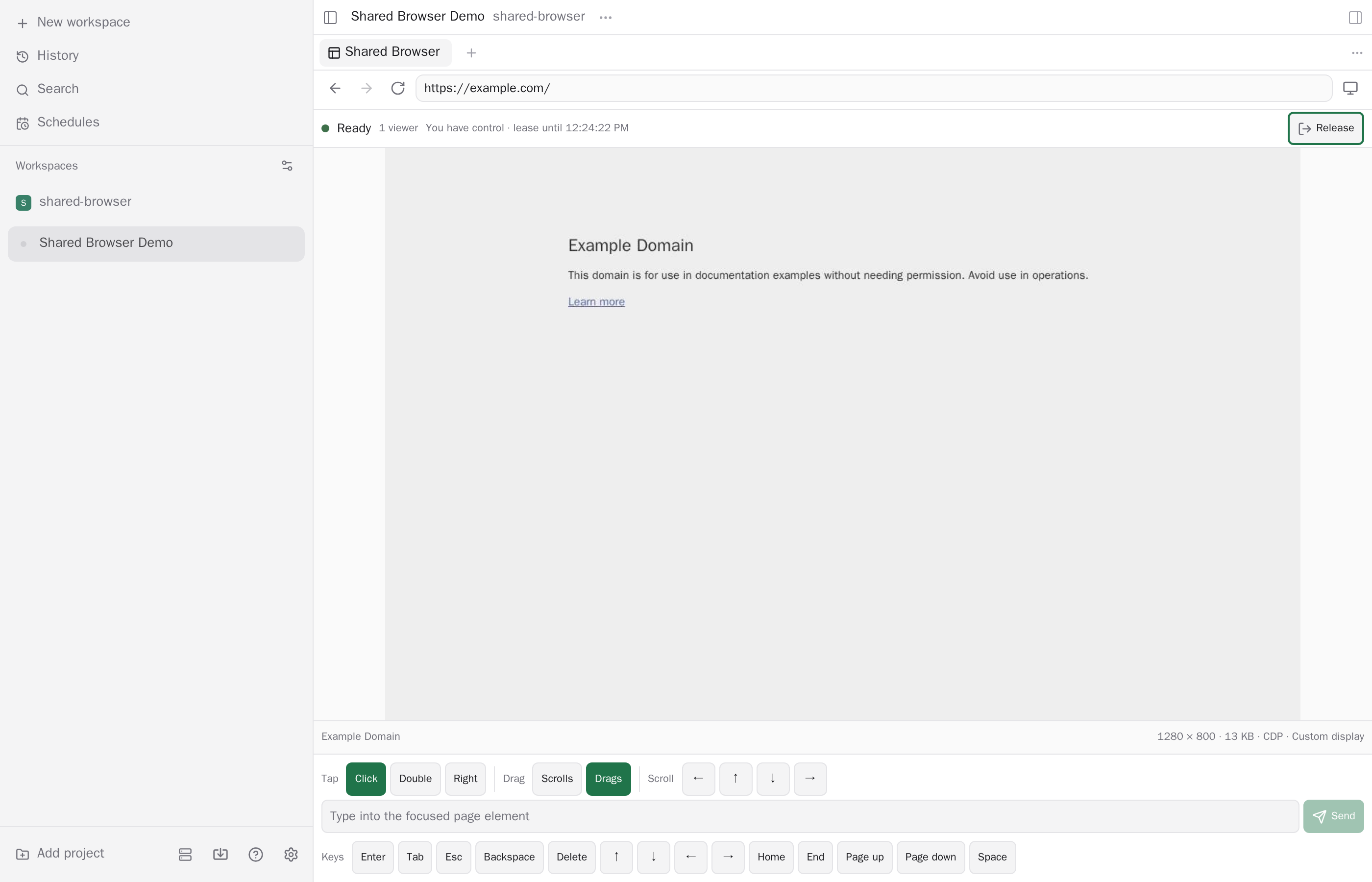
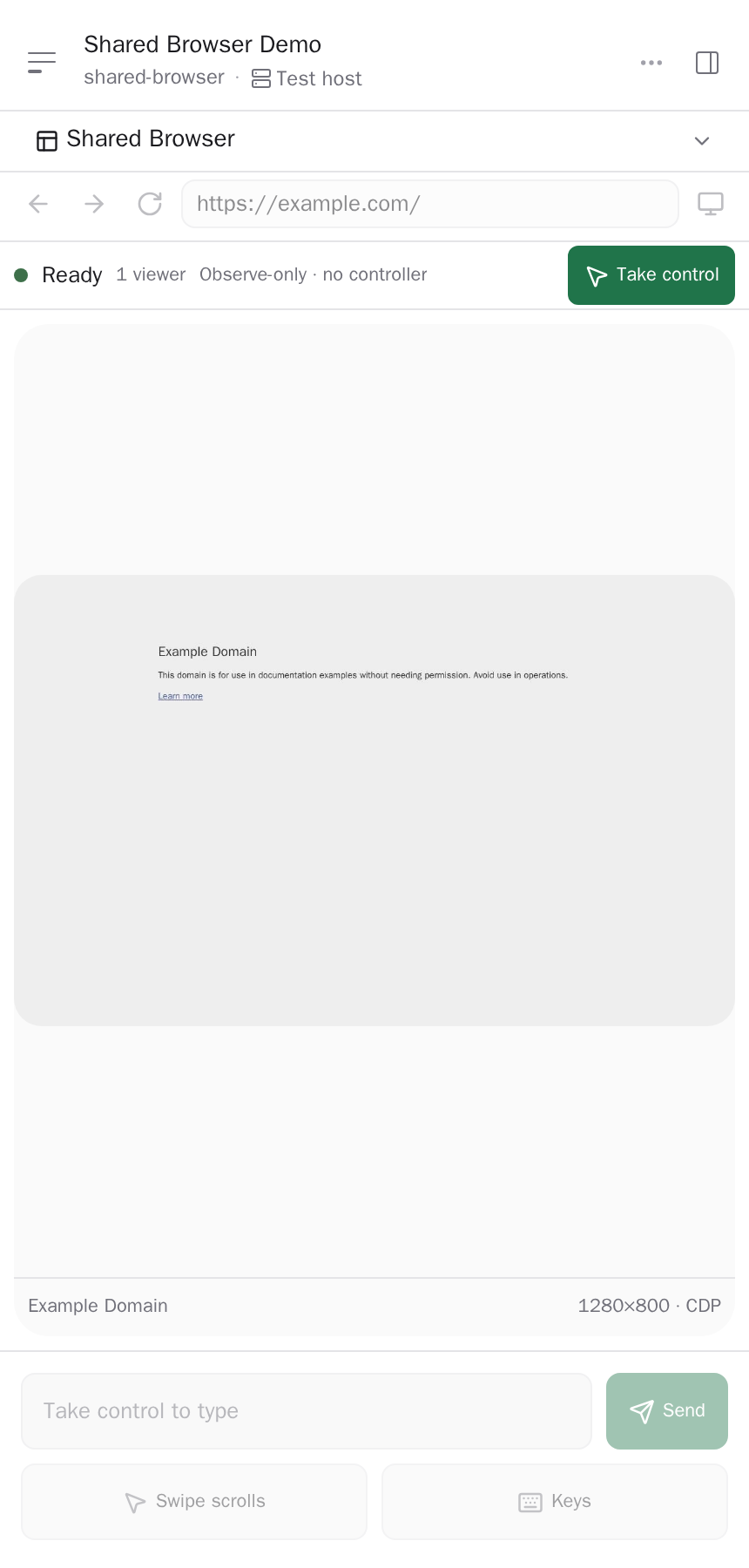
Both PNGs show the same isolated Chromium session from a dedicated Paseo test daemon. They were captured at 2× pixel density after browser DevTools verified the rendered page contained no private organization names.
Wide desktop
Compact client
Runtime model
- The plugin server runs beside the Paseo daemon and starts one
agent-browsersession and Chromium process per open browser workspace. Browser execution, profiles, IPC, and network access are on the daemon host, not on the viewing phone, browser, or desktop app. - The plugin owns
agent-browserversion0.37.1, its IPC directory, and the Chromium executable. It strips inheritedAGENT_BROWSER_*variables and setsAGENT_BROWSER_SOCKET_DIR,AGENT_BROWSER_IDLE_TIMEOUT_MS=0,AGENT_BROWSER_STREAM_PORT=0, andAGENT_BROWSER_NO_AUTO_DIALOG=1itself. - Frames stream from Chromium through CDP
Page.startScreencast, with a bounded screenshot fallback. Remote input supports tap, double-tap, right-click, drag, swipe scrolling, text, and special keys. - Device presets for Desktop Chrome, iPhone 15 Pro, Pixel 7, and iPad Pro 11 change Chromium's viewport, device pixel ratio, touch behavior, platform, and user agent. A phone can view and control the shared browser, but the rendered browser remains Chromium. An iPhone preset is mobile emulation, not WebKit, iOS, or real Safari.
Lifetime and persistence
The browser runtime is held by a detached supervisor rather than by a particular Paseo client or plugin subprocess. Closing a panel, disconnecting a client, or losing the plugin bridge invalidates that client's viewer/control tokens but does not immediately close Chromium. A replacement plugin bridge can reclaim the existing workspace runtime. If no bridge reconnects, the supervisor closes all orphaned runtimes after a 120-second grace period. A missed heartbeat fences the old bridge after 30 seconds; the bridge sends heartbeats every 10 seconds.
Each workspace gets a private profile under
$PASEO_HOME/plugin-data/shared-browser/profiles/<workspace-id-sha256>. Cookies and site login state
therefore survive viewer disconnects, plugin reloads, and Chromium process restarts while that
directory remains intact. Profiles are local to one daemon host: they are not synchronized between
hosts or Paseo clients, do not use a personal Chrome or Safari profile, and are not portable across
arbitrary Chromium versions.
When Paseo emits workspace.archived while the plugin server is active, the plugin fences that
workspace, expires its viewers and controller, and closes its browser runtime, including a runtime
whose creation raced the archive. The profile directory is retained. Archive events missed while
the plugin bridge is disconnected are not replayed or reconciled by the plugin; the orphan grace
still closes the runtime, but retained profile data must be removed manually if it is no longer
wanted.
Install
Enable trusted plugins on the target Paseo daemon, then install from npm:
paseo plugin install npm:@omercnet/paseo-shared-browser
paseo plugin ls
When Paseo acquires the npm package, it runs the npm run prepare:runtime build hook automatically. The
hook installs the pinned browser runtime, builds both supervisor.cjs and shared-browser-mcp.cjs
under a versioned directory in $PASEO_HOME/plugin-data/shared-browser, then atomically updates the
runtime-current pointer. Existing processes keep using their immutable runtime during an update.
The build requires Node.js 24 or newer and npm on the daemon host. On Linux x64, macOS, and
Windows, runtime preparation installs and stages the platform's Chrome for Testing distribution. On
Linux ARM64, where that download is unavailable, the installer automatically uses native Chromium
from /usr/bin/chromium. Install a non-Snap Chromium build with the system package manager before
adding the plugin. Set PASEO_SHARED_BROWSER_CHROMIUM_EXECUTABLE to an absolute path when Chromium
is installed elsewhere. The plugin does not emulate x64 Chromium on Linux.
On Windows, the upstream installer retains its Chrome download cache under the OS user profile. Before upgrading the plugin on Windows, close active Shared Browser sessions and stop the Paseo daemon; Windows does not allow the installer to replace runtime executables that are still running.
Open a workspace, search the Command Center for Open Shared Browser, or tap the Shared Browser composer pill while a workspace session is open. On Paseo 0.11 or newer, a Shared Browser (n) row in the sidebar footer appears while browser sessions are open; it lists them and jumps to the chosen workspace's browser panel.
Agent MCP access
The plugin automatically injects its stdio MCP adapter only when a new, non-internal agent is created with a provider that accepts external MCP servers. Agents that already exist, resumed sessions, imported sessions, and Paseo's internal agents are not modified. Paseo's built-in OMP provider accepts session MCP servers from Paseo 0.11, so new OMP agents receive the adapter there. On Paseo 0.9 and 0.10 the built-in OMP adapter rejects external MCP servers, so OMP agents are left unchanged. Pi agents continue to receive the adapter, but they require Pi's optional MCP support to launch it.
The injected MCP server exposes exactly these tools: shared_browser_status,
shared_browser_capture, shared_browser_acquire_control, shared_browser_release_control,
shared_browser_navigate, shared_browser_input, and shared_browser_viewport. It does not
expose arbitrary CDP commands, JavaScript or page evaluation, browser profile access, or filesystem
access.
Each adapter launch receives an opaque credential bound to its workspace. It cannot use that credential to operate another workspace's browser. Agent input follows human-priority control: an agent cannot force a takeover while a human viewer holds control. The human must release control or the lease must expire before agent input can proceed.
The provider launches the stdio adapter on the Paseo daemon host, beside the daemon-owned browser runtime. Web, desktop, and mobile clients never own or host the adapter or Chromium, and a client disconnect does not close or reset either process.
Runtime environment overrides
The plugin recognizes only these deployment overrides:
| Variable | Meaning |
|---|---|
PASEO_HOME | Paseo data root. Defaults to ~/.paseo; browser runtime, supervisor IPC, and profiles live below plugin-data/shared-browser. |
PASEO_SHARED_BROWSER_AGENT_BROWSER_BINARY | Absolute path to the pinned agent-browser executable. Defaults to the active runtime's node_modules/.bin/agent-browser (agent-browser.exe on Windows). |
PASEO_SHARED_BROWSER_CHROMIUM_EXECUTABLE | Absolute path to Chromium. Defaults to the active runtime's chromium/chrome (chrome.exe on Windows). On Linux ARM64, installation automatically links /usr/bin/chromium; use this override for another compatible, non-Snap location. |
PASEO_SHARED_BROWSER_CHROMIUM_ARGS | Optional Chromium arguments passed through the managed runtime. Intended for host requirements such as --no-sandbox in an already-isolated CI runner; do not disable the browser sandbox on a general-purpose host. |
User-supplied AGENT_BROWSER_* variables are deliberately ignored.
Controls
- Toolbar: back, forward, reload, address bar, and device emulation.
- Status row: session state, viewer count, controller, and lease expiry.
- Human control: Take control, Release, and Take over for explicit handoff. Agent MCP calls have no forced-takeover operation.
- Mobile: swipe scrolls by default; pointer and keyboard options open as bottom sheets.
Security boundary
- Paseo plugins are trusted, unsandboxed code. The plugin server, detached supervisor,
agent-browser, Chromium, and other processes running as the daemon OS user share one trust boundary and can reach that user's files, processes, credentials, and network. - Supervisor IPC uses a user-private Unix socket on Linux and macOS or an installation-specific
named pipe on Windows, plus a token file under Paseo's user data root for every connection. On
Windows, file privacy relies on the ACL inherited from
PASEO_HOME; custom locations must remain private to the daemon user.agent-browseruses loopback TCP for its command and stream services on Windows, so Windows support assumes a trusted single-user host; these services are not an isolation boundary between local OS users. agent-browserIPC metadata and workspace profile directories are owner-only on POSIX systems. The plugin rejects a non-loopback CDP endpoint.- Viewer and control tokens coordinate clients already paired to the same Paseo daemon. Plugin RPC callbacks expose no authenticated caller identity, so these human-viewer tokens are a workflow safeguard, not an authorization boundary. The stdio MCP adapter separately uses an opaque, workspace-bound credential.
- Downloads, uploads, clipboard synchronization, media permissions, extensions, native passkeys, and platform authenticators are not exposed by this plugin.
- Browser navigation uses the daemon OS user's network access, including local development servers. It is therefore a trusted-agent capability; this plugin deliberately does not apply a blanket loopback or RFC1918 navigation ban.
Develop
bun install
bun run typecheck
bun run lint
bun run format:check
bun run test:unit
bun run prepare:runtime
bun run test:smoke launches the configured real Chromium runtime and exercises two viewers,
control handoff, reconnect, stale-frame rejection, viewport changes, device emulation, profile
persistence, and archive teardown.
Release Please maintains the version, changelog, component tag, and GitHub release from Conventional Commits in the monorepo.
Both the Paseo daemon and app must satisfy ^0.9.0 || ^0.10.0 || ^0.11.0. The client surface uses React Native primitives
and works in desktop, web, iOS, and Android Paseo clients.
More in Workspace panels
View allMore from Omer Cohen
View allAgent Monitor
Omer Cohen
A Paseo plugin that provides a host-wide agent triage roster.
Dracula
Omer Cohen
Dracula Classic and Alucard Classic themes for Paseo.
Fresh Worktrees
Omer Cohen
Fast-forwards clean local base branches before Paseo creates branch-off worktrees