
PromptKit
PromptKit - rewrite and transform prompts directly from the Paseo composer.

PromptKit
PromptKit is a Paseo plugin that rewrites the prompt in your Composer before you send it. It adds a PromptKit pill to the Composer and a /rewrite <prompt> slash command. The rewrite replaces the Composer text in your own voice — first person, speaking to the agent — and keeps your language and every protected literal (URLs, absolute paths, shell commands, code blocks, model and tool names).

The rewrite runs one of three ways, chosen in Settings: the agent's own provider CLI with the model the Composer shows (the default), a provider CLI with a model you pick, or a direct request to an API you configure (OpenAI, Anthropic, Google Gemini, Cloudflare Workers AI, or anything speaking one of those protocols). A CLI runs headlessly in a temporary directory — no Paseo agent, no tab, no archive, no saved session — so your conversation never receives a rewrite turn.
See CHANGELOG.md for release notes.
Three ways to run it
- The pill — write your prompt, press
PromptKit. The text is rewritten in place; a leading/rewriteleft in the text is ignored. Available once the agent exists, so on a new seat it appears after the first message. /rewrite <prompt>— type the command with the prompt after it and press Enter. Paseo empties the Composer and hands the text to PromptKit, which puts the/rewrite …line straight back, dims it with a light sweep while it works, and then replaces it with the rewrite. A failed rewrite leaves your line in place. Available immediately, including on a new seat before its first message. Because no agent exists yet on a draft,/rewritecannot useCurrent agent model; chooseDedicated modelorDirect APIwith a selected endpoint and model in Settings, or use the pill once the agent exists.- The PromptKit sheet (mobile) — write in the Composer as usual and press the pill. A sheet slides up holding your text. With one enabled action it rewrites at once and Rewrite runs it again; with several, each action has its own button and nothing runs until you press one. Send gives the message to the agent, clears the Composer and closes the sheet. ✕ closes the sheet and leaves the Composer untouched.
No path sends the message on its own. You review the result and send it yourself.
The General action
General is the one action that ships. It turns the draft into a clear instruction the agent can act on: the concrete action, each constraint made checkable, the working steps for that kind of task (find the cause first, follow the codebase's existing way, keep the change scoped), and how the agent knows it is done. A question stays a question: it is made clear, never turned into an instruction. It never invents files, numbers, requirements or decisions the draft does not contain, and it never writes about you as "the user". Add your own actions under Settings → Custom actions.
[!NOTE] To keep a passage exactly as written, wrap it in backticks —
`inline text`— or in a fenced block (```). PromptKit treats quoted code, paths and blocks as protected literals and refuses a rewrite that drops or changes them, so the rest of the prompt is rewritten around them. For long material (a log, a spec, a large snippet), attach it as a file and refer to it in the prompt instead: the agent reads the file, and only your instructions around it are rewritten.
Requirements
- Paseo
>=0.9.0(Desktop, Web or mobile). Built and tested against the 0.9.0 plugin SDK. - For Provider CLI: that provider's CLI on the daemon's
PATH, and a model it can reach. - For Direct API: an endpoint URL, a model id, and a key — see API keys.
Install from npm (recommended)
PromptKit is published on npm as paseo-prompt-kit. On Paseo 0.9:
paseo plugin add npm:paseo-prompt-kit
paseo plugin ls
Pin a release by adding its version, for example npm:paseo-prompt-kit@0.6.0. The plugin id stays prompt-kit, so reload and logs use that id:
paseo plugin reload prompt-kit
paseo plugin logs prompt-kit
Install from a local directory
cd /path/to/paseo-prompt-kit
npm install
npm run typecheck
paseo plugin install /path/to/paseo-prompt-kit
paseo plugin ls
paseo plugin install trusts the plugin: server code runs unsandboxed on the daemon host and client code runs inside Paseo. Reload after a code change:
paseo plugin reload prompt-kit
paseo plugin logs prompt-kit
Install from Git
Install a managed Git checkout:
paseo plugin install hungcuong9125/paseo-prompt-kit --ref main
paseo plugin ls
--ref chooses the initial branch, tag, or commit once; later paseo plugin update prompt-kit follows the remote's default HEAD. Pin a release instead of tracking main by giving --ref a tag:
paseo plugin install hungcuong9125/paseo-prompt-kit --ref v0.6.0
paseo plugin ls reports the installed commit.
Settings
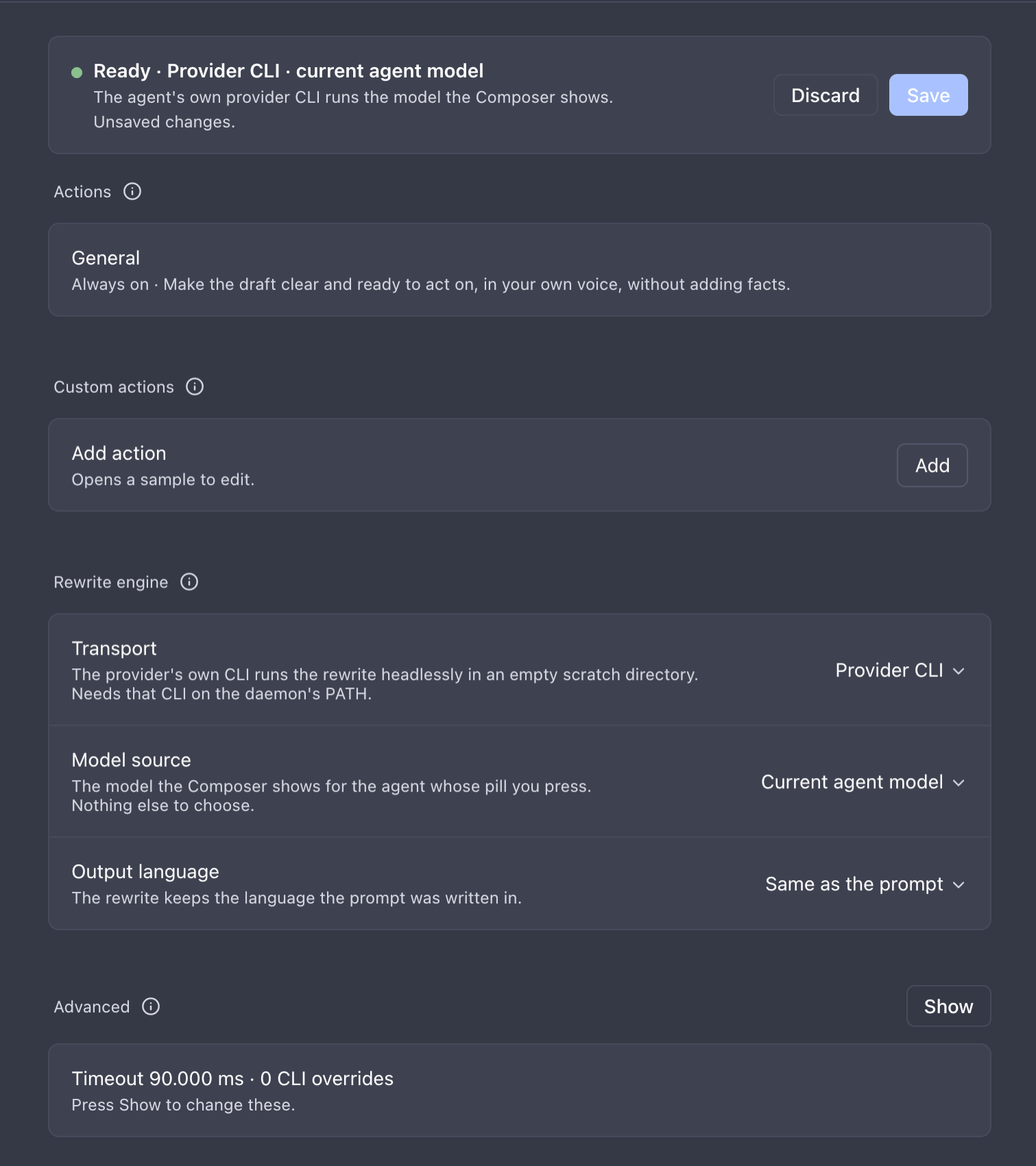
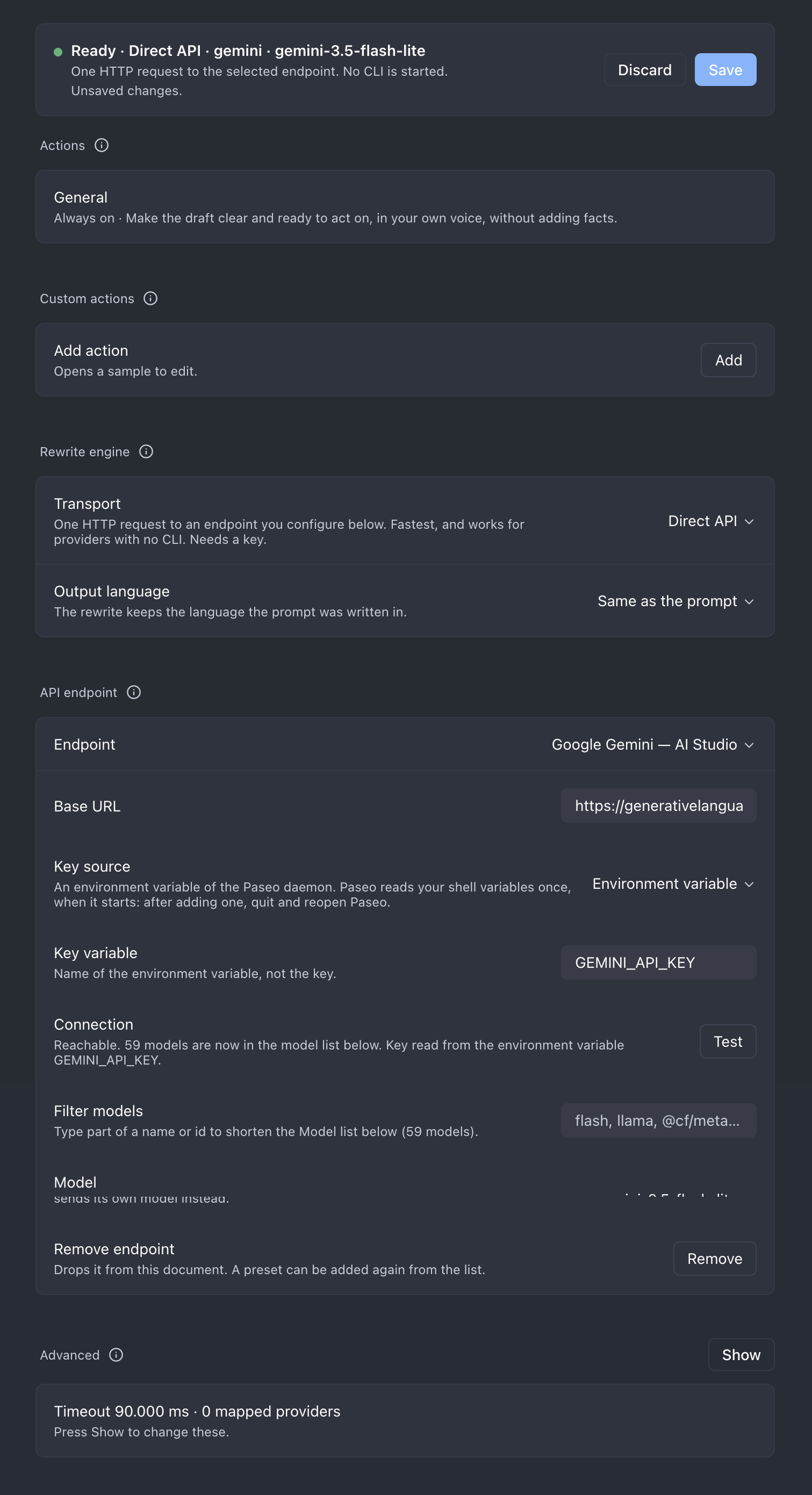
Open PromptKit's settings from Paseo Settings → Plugins → the … menu on prompt-kit → Settings. The bar at the top says whether a rewrite would run and over which path, names the reason when it would not, and holds Save / Discard once something has changed. Nothing is written until Save.

The screen reads top to bottom in setup order:
- Actions — one switch per action, bundled or custom; up to 6 can be on. One enabled action makes the pill rewrite at once; two or more make it a menu (on mobile, one button per action in the sheet); none hides the pill. A lone action shows as Always on, with no switch. Saving updates every pill at once.
- Custom actions — your own actions, written as action-pack JSON in a text box on the same screen. Add opens a sample (Blank template, Copy of General, Find the cause, Plan first, Review, Testable requirements, Session handoff, or a copy of one of yours); change the id, title and instructions, press Apply to check the JSON, then Save. They run through the same rewrite as
General. - Rewrite engine — Transport, Model source (Provider CLI only) and Output language. Every other section appears only when these need it.
- Dedicated model (Provider CLI with Dedicated model) or API endpoint (Direct API).
- Advanced (collapsed) — timeout, debug log and the two per-provider overrides.
Transport
Provider CLI(default) — the provider's own CLI runs the rewrite headlessly. The model comes from Model source.Direct API— PromptKit posts to an endpoint you configure. No CLI is started, and there is no Model source: the model is chosen in the API endpoint section.
How each CLI runs a rewrite:
| CLI | How it runs | How the rewrite rules reach it |
|---|---|---|
claude | One claude -p process per rewrite: no tools, none of your MCP servers, hooks or skills, no saved session | --system-prompt |
pi | One pi -p process per rewrite: no tools, context files, skills, extensions or session | --system-prompt |
opencode | One opencode run process per rewrite | An inline agent with every tool off, passed in OPENCODE_CONFIG_CONTENT |
codex | One warm codex app-server kept by the plugin; each rewrite is a turn on an in-memory (ephemeral) thread | Thread developer instructions |
codex keeps a warm server. codex keys the model provider's prompt cache by thread, so a thread that already carries the rewrite rules answers much faster: measured on gpt-6-luna with low effort, about 7 s for the first rewrite on a new thread and 2.4–3 s for the next ones, against about 7 s for every one-shot codex exec. A thread serves one model and one set of rules, runs at most 8 rewrites and is then dropped, so earlier drafts never pile up in its context. Two rewrites at once each get their own thread. A timed-out rewrite is interrupted and its thread dropped. The server starts on the first codex rewrite, stops after 10 minutes without one, and stops with the plugin; nothing is written to disk.
Model source (Provider CLI only)
Current agent model— the model the Composer's model control is showing for the agent whose pill you pressed. PromptKit reads the same value Paseo does (the provider session's runtime model first, then the configured model), so what you see is what runs.Dedicated model— a provider, model and thinking option you pick from the daemon's provider catalog, whatever the agent itself runs.
Output language
Same as the prompt (default) keeps the language you wrote in. English, Tiếng Việt, 日本語, 中文, 한국어, Español, Français, Deutsch, or any language you add translates the prose while paths, commands, code and names stay exactly as written. A language is one JSON file under shared/languages/; see docs/guides/output-languages.md.
The three paths
| Transport | Model source | What runs |
|---|---|---|
Provider CLI | Current agent model | The agent's own provider CLI with the model the Composer shows |
Provider CLI | Dedicated model | The dedicated provider's CLI with the model you picked |
Direct API | — | An HTTP request to the endpoint and model chosen under API endpoint |
On Direct API, an agent whose provider is mapped under Advanced → Endpoint per provider sends its own model to that endpoint instead — this is how you point a provider such as opencode at your own OpenAI-compatible endpoint. Every other agent uses the endpoint and model from the API endpoint section; with no endpoint selected, only mapped providers can rewrite.
API endpoint
Choose an endpoint — presets and your saved custom endpoints are listed A–Z (Anthropic, Cloudflare Workers AI, Google Gemini, Groq, Local server, OpenAI, OpenRouter), with Custom endpoint… last — fill in the base URL, pick a Key source (see API keys), and press Test. A successful test fills the Model list from the endpoint; the rewrite refuses a model outside that list. When a list has more than 8 models, a Filter models row above Model narrows the dropdown by name or id; the saved model always stays in it. Save is blocked while the endpoint cannot work (for example an empty base URL), with the reason in the status bar.

Advanced
Timeout (ms): how long a rewrite may run, default25000, allowed range1000–600000. The daemon drops a plugin call at 30 s, so a rewrite stops at 27 s whatever the setting says and reports its own timeout; the screen notes when a budget above that cannot be reached.Debug log: off by default. Off, the plugin log gets one line per rewrite,rewrite successwithdurationMs(the whole call) andmodelMs(the model call alone, so a slow rewrite is blamed on the endpoint or on the plugin), orrewrite failedwith the error code. On, it also getsdebuglines tagged with onerequest=id: the resolved target, the CLI command line (system prompt reduced to its length) with exit code, timing and stdout/stderr excerpts, or the HTTP URL, status, rate-limit headers and a body excerpt. Keys and Cloudflare account ids are never written; the excerpts can contain the model's answer, so read them before sharing. See Reporting a bug.CLI per provider(Provider CLI): lists only the providers you have overridden, plus an Add row. A provider named after its CLI (for examplepiorcodex) resolves on its own and needs no entry; an unresolved provider is refused, never guessed.Endpoint per provider(Direct API): lists only mapped providers, plus an Add row. Pressing the pill in an agent of a mapped provider sends that agent's own model to the endpoint over HTTP. A mapped provider ignores the Model chosen under API endpoint.
Settings are host-scoped and persist across plugin reload.
API keys
An API key is never stored in PromptKit's settings document. That document is read by the client — including the Paseo Web UI — so a key placed there would leave your machine. Instead each endpoint picks one Key source in the API endpoint section, and the daemon reads the value at request time from that source only. There is no fallback: a key missing from the chosen source fails closed with missing_api_key, the message names the variable and the place it looked, and the Composer text is untouched.
| Key source | Rows shown | Where the value is read |
|---|---|---|
Environment variable (default) | Key variable | The daemon's environment variable with that name. The plugin server inherits the daemon's environment, so this suits a daemon started from a shell. |
secrets.json | Key variable, Secrets directory, API key (optional); Cloudflare also Account ID | The entry with that name under apiKeys in <Secrets directory>/secrets.json. |
No key | — | Nothing. For a local server (vLLM, llama.cpp, LM Studio). |
Secrets directory is shared by every endpoint that uses secrets.json. It must be an absolute path or start with ~/. Empty means <PASEO_HOME>/plugin-settings/prompt-kit; PASEO_HOME defaults to ~/.paseo, so on macOS the default file is ~/.paseo/plugin-settings/prompt-kit/secrets.json.
After a successful Test, the Connection row says which source the key came from.
Why the file exists at all
Paseo Desktop reads your login shell's environment once, when it starts, and the daemon keeps that copy. A key exported in ~/.zshrc after Paseo started does not reach it until you quit and reopen Paseo; a daemon started some other way (a service, a remote host) may never see it. secrets.json is read at request time, so it works however and whenever the daemon was started.
secrets.json format
One file holds every key: one entry per key under apiKeys, named whatever you like. Each endpoint whose Key source is secrets.json points at one entry through its Key variable, so several endpoints — or two accounts of one vendor, e.g. GEMINI_WORK and GEMINI_PERSONAL — share the file. Values must be strings; any other value is ignored.
{
  "version": 1,
  "apiKeys": {
    "OPENAI_API_KEY": "sk-...",
    "ANTHROPIC_API_KEY": "sk-ant-...",
    "GEMINI_API_KEY": "AIza..."
  }
}
Start from the template in this repository and keep it owner-only:
mkdir -p ~/.paseo/plugin-settings/prompt-kit
chmod 700 ~/.paseo/plugin-settings/prompt-kit
cp docs/templates/secrets.template.json ~/.paseo/plugin-settings/prompt-kit/secrets.json
chmod 600 ~/.paseo/plugin-settings/prompt-kit/secrets.json
Then replace each replace_me, delete the entries you do not use, and set the matching endpoints' Key source to secrets.json.
Storing a key from Settings (convenience, least preferred)
[!WARNING] Typing a key into the API key field sends the secret from the Paseo app to the daemon once, over the same connection Paseo uses. When you use Paseo Web or a client on another machine, the key crosses that link. Anyone who can open your Paseo settings can also overwrite or remove stored keys. Use this only on a machine and connection you trust.
Prefer, in this order:
- An environment variable of the daemon (Key source
Environment variable) — nothing leaves the daemon's machine and no file holds the key. - Editing
secrets.jsonyourself on the daemon's machine, as above — the key never passes through the Paseo app. - The API key field — only when neither of the above is practical.
With Key source secrets.json, the API endpoint section shows an API key field (masked) and a Store API key row. Save writes the value under the endpoint's Key variable in secrets.json: other entries and fields are kept, the directory is created 0700 and the file written 0600 through a temporary file and a rename, and a malformed file is refused rather than overwritten. The field is cleared after saving. The key is write-only: the screen only says whether a value is stored, and Remove stored API key deletes that one entry. The value never enters the settings document, a log, or an RPC answer. Two clients saving at the same moment can overwrite each other's change.
What PromptKit guarantees about keys
- The value is never written to the settings document, never returned by any RPC, and never written to a log or an error message. A failure names the variable (
The environment variable "GEMINI_API_KEY" is not set), not the value. - The key is read at request time and used for that one request only. It is not cached to disk.
- PromptKit writes
secrets.jsononly when you press Save or Remove in the API key rows, and only the one entry named by the endpoint's Key variable. It never reads a value back to the app. - An endpoint whose Key source is
No keysends no credential. That is valid for a local server (vLLM, llama.cpp, LM Studio), which is why it is allowed rather than treated as an error.
Endpoint configuration
Endpoints are defined in the settings document under apiEndpoints, because that is the only configuration store a Paseo plugin can read. A provider profile in ~/.paseo/config.json is not visible to PromptKit: the daemon does not pass provider environment variables to plugins.
Each endpoint is one of four protocols. Adding a vendor that speaks one of them is a settings edit, not a code change:
| Protocol | Request | Works with |
|---|---|---|
openai | POST <baseUrl>/chat/completions, Authorization: Bearer | OpenAI, OpenRouter, LiteLLM, vLLM, llama.cpp, LM Studio, Together, Fireworks, Groq, most gateways |
anthropic | POST <baseUrl>/v1/messages, x-api-key | Anthropic, z.ai, Alibaba/Qwen, Anthropic-compatible gateways |
gemini | POST <baseUrl>/v1beta/models/<model>:generateContent, x-goog-api-key | Google AI Studio, Vertex |
cloudflare | POST <baseUrl>/accounts/<account id>/ai/run/<model>, Authorization: Bearer | Cloudflare Workers AI (@cf/... models) |
The openai protocol sends max_completion_tokens and the anthropic protocol max_tokens, both sized from the draft (256 plus about 1.5 times the draft's tokens, at most 8192). Groq and Anthropic reserve per-minute output quota from that number, so a small one fits more rewrites into a low tier's minute: with Groq's 1000-token free-tier limit, about two short rewrites a minute pass and the next answers HTTP 429 until the minute rolls over. An answer that stops at the limit is refused, never pasted.
Cloudflare Workers AI. Base URL https://api.cloudflare.com/client/v4. The endpoint has an extra Account ID row, above Key variable, holding the name of the variable with your account id — prefilled CLAUDFLARE_ACCOUNT_ID, change it if yours differs. The account id is read from the same Key source as the token, so with secrets.json both live in the file and work however Paseo was started. The key variable defaults to CLOUDFLARE_AUTH_TOKEN, an API token with Workers AI permission. Models are the full @cf/... ids, for example @cf/meta/llama-3.1-8b-instruct-fp8; Test lists the account's text-generation models. PromptKit sends max_tokens: 2048 because the service default of 256 tokens would cut a rewrite short.
Example — a Google Gemini endpoint with gemini-2.5-flash-lite, from the settings document:
{
  "transport": "api",
  "apiEndpointId": "gemini",
  "apiModel": "gemini-2.5-flash-lite",
  "apiEndpoints": [
    {
      "id": "gemini",
      "label": "Google Gemini",
      "protocol": "gemini",
      "baseUrl": "https://generativelanguage.googleapis.com",
      "keySource": "env",
      "apiKeyEnv": "GEMINI_API_KEY",
      "models": ["gemini-2.5-flash-lite"]
    }
  ]
}
Fast, stable-quality testing. For a quick feedback loop while trying out actions or a
custom action pack, Groq's openai-protocol endpoint with qwen/qwen3.8-27b returns a rewrite
in roughly 1–2 seconds and holds up well against the General action's instruction-shape and
protected-literal checks — a good default before switching to a slower, higher-quality model for
the final pass. Example, from the settings document:
{
  "transport": "api",
  "apiEndpointId": "groq",
  "apiModel": "qwen/qwen3.8-27b",
  "apiEndpoints": [
    {
      "id": "groq",
      "label": "Groq",
      "protocol": "openai",
      "baseUrl": "https://api.groq.com/openai/v1",
      "keySource": "env",
      "apiKeyEnv": "GROQ_API_KEY",
      "models": ["qwen/qwen3.8-27b"]
    }
  ]
}
Example — point one provider at an endpoint, so it never pays a CLI cold start:
{
  "transport": "api",
  "apiEndpointByProvider": { "opencode": "openrouter" }
}
An endpoint that lists models restricts the choice to that list, and a model outside it fails closed with invalid_model before any request. Leave models empty to accept any model id — correct for a local server whose list PromptKit cannot know.
API failure codes
| Code | Meaning |
|---|---|
missing_api_key | The endpoint's Key source has no value for its key variable, secrets.json is missing or malformed, or the secrets directory is not absolute |
api_endpoint_unknown | The selected or mapped endpoint id is not defined in apiEndpoints |
invalid_model | The model is not in the endpoint's models list |
api_http_error | The endpoint answered a non-2xx status, or was unreachable |
api_bad_response | The answer was not JSON, carried no text, or stopped at the model's output token limit |
timeout | The request exceeded Timeout (ms) |
Every one of these leaves the Composer text untouched.
Limitations
- In-place rewriting works on Desktop and Web only: the mobile app renders the Composer as a native text input with no DOM, and Paseo 0.9.0 exposes no plugin API for Composer text. On mobile the
PromptKitpill opens the PromptKit sheet instead (see above); it reads and clears the Composer through the app's React tree rather than the DOM, which a Paseo update can break in the same way. Nothing is copied or sent on its own./rewriteis not available on mobile. On Web, a refusal names what was found (no Composer, none visible, or more than one visible). - Requires Paseo
>=0.9.0. Because text access depends on the Composer DOM (or, on mobile, the React tree), a Paseo UI change can break it even when the public plugin SDK is compatible. - PromptKit refuses to replace text you edited while a rewrite was running, and refuses when more than one Composer (or none) is visible.
- Only
Generalships. Any other action is a custom action you write in Settings, or a pack you bundle as a JSON file — seedocs/EXTENDING.md. - A rewrite has at most 27 seconds, because the daemon drops a plugin call at 30 s. The API transport does not stream, and a slow CLI model can take longer (
opencodewithzcode/glm-5.3-flashtook about 33 s); PromptKit then reports its own timeout. Use a faster model or the Direct API transport. - No OAuth or token refresh: an endpoint uses a static key. A provider that needs an interactive login is better served by the CLI transport.
Reporting a bug
- Settings → Advanced → turn Debug log on and save.
- Reproduce the failure once.
- Run
paseo plugin logs prompt-kitand copy the lines with the failingrequest=id, fromdebug rewrite starttorewrite failed. - Read the excerpts, remove anything private, and attach them to the issue. Turn Debug log off again.
Project layout
The host compiler accepts only client/, server/ and shared/ at the root, so the modules live inside them. docs/CORE.md names each module's one responsibility; docs/guides/ walks through the two data-only extensions (a new action pack, a new output language); docs/EXTENDING.md covers those plus API protocols, CLI families and settings sections, with templates under docs/templates/.
License
MIT — see LICENSE. PromptKit contains no copied upstream code. The Composer text access pattern follows paseo-emoji (MIT); the plugin runs on Paseo (Apache-2.0) through its public plugin SDK.
</content>