
Machine Status
Machine dashboard, open ports and Docker control inside Paseo
$ paseo plugin add dutchakdev/machine-status

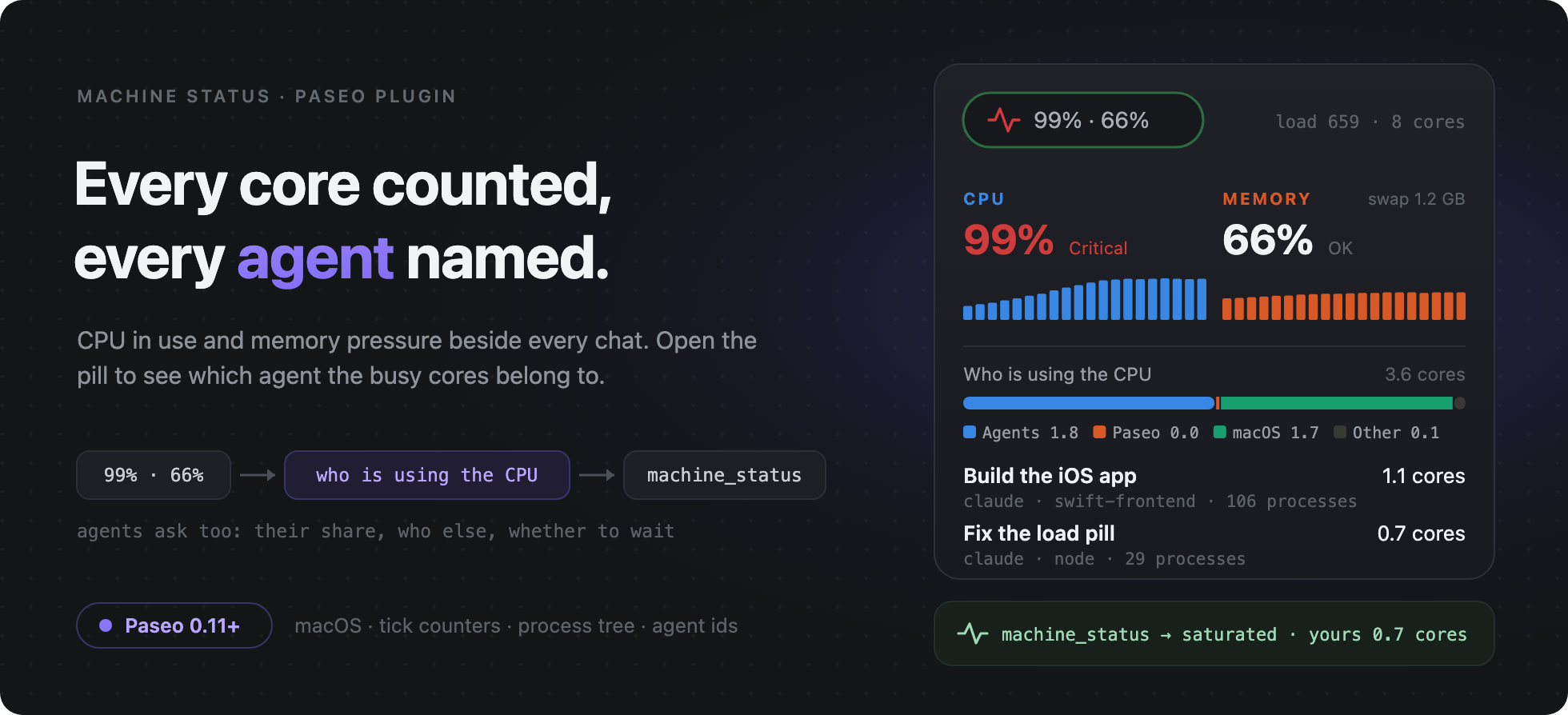
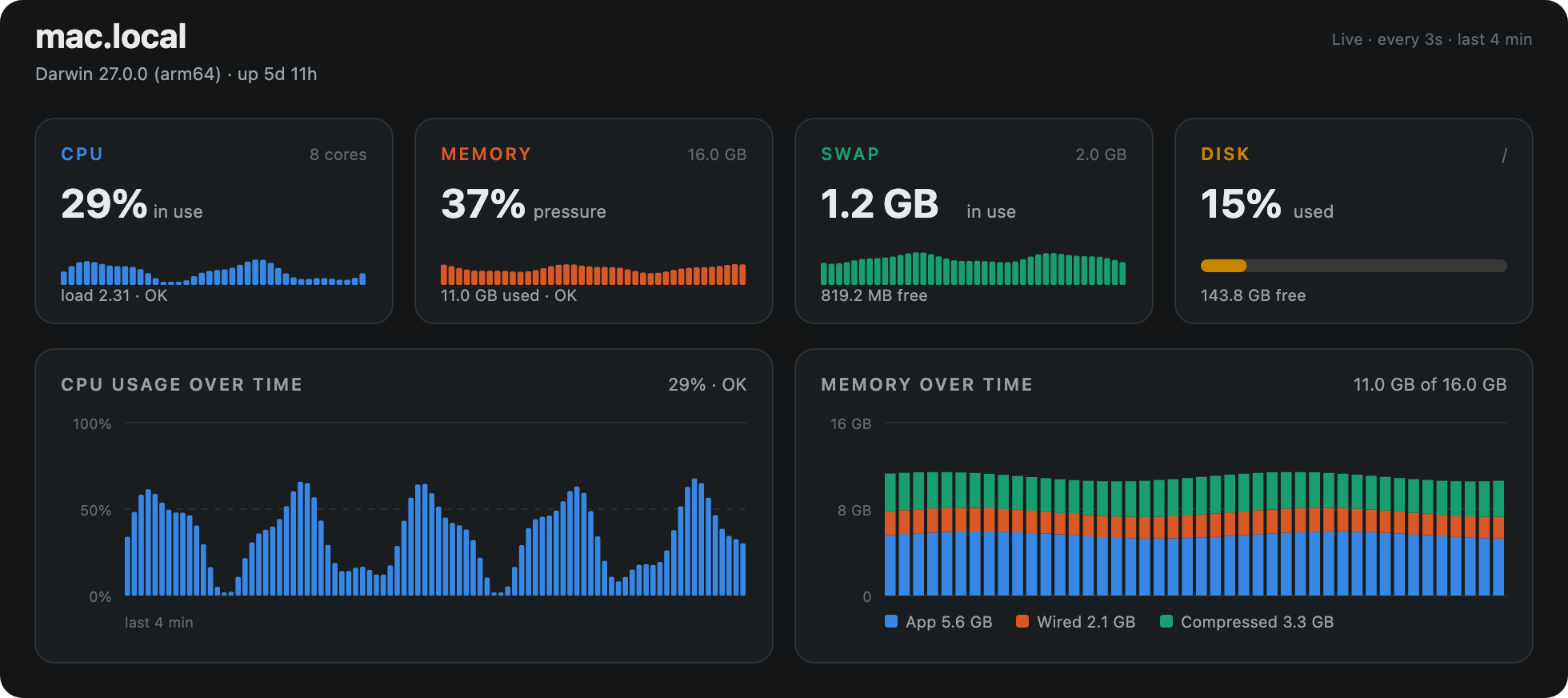
Machine Status shows what the daemon's Mac is doing while your agents work, and which agent is doing it: CPU in use, memory pressure, swap, disk, battery and thermal state, the ports and background processes your agents started, and the Docker engine. It also clears developer caches and stops runaway processes, with a confirmation step for each.
What you get
- Machine screen, opened from the sidebar or ⌘K. Overview has stat tiles that expand into detail, CPU and memory charts, a dev-cache scanner, and a process table. Ports & services lists listening ports and what runs behind them. Docker shows the engine, containers and disk usage.
- Load pill beside every agent's composer with CPU in use and memory pressure. Pressing it opens a compact card with the trend, the cores each agent keeps busy, the top CPU processes, and the development ports held by agents, so you can tell whether the machine is the problem without leaving the chat.
- Who is using the CPU, in the card and on the Overview: each agent, Paseo, macOS and the rest, in cores. Processes an agent left running outside its tree still count as that agent's.
- Per-core bars with efficiency and performance cores apart, and a line that reads the pattern: a single-threaded step, background work, or a saturated machine.
- Agent tools on Paseo 0.14 and newer:
machine_statusgives an agent the machine's state, its own share and a line of guidance before heavy work;machine_explain_processexplains one PID. - On Paseo 0.11 and newer, ⌘K can open the screen straight on Ports & services or Docker.
How it decides
- CPU is utilisation from the kernel's tick counters, never load average, so it cannot pass 100%. Load stays visible as threads per core.
- Memory follows Activity Monitor's split, and the pressure figure is macOS's own. Cached files are not counted as used.
- A process belongs to an agent when its environment, or an ancestor's, carries that agent's
PASEO_AGENT_ID, not when its name looks like a provider. Only the id is read from the environment; nothing else is kept. - A busy process is called a fresh burst or a steady load by its CPU time over its whole life, not by its uptime. A port counts as a development port by its executable's path, not by its number. System ports are hidden until you choose Show system.
- Values the plugin cannot read are shown as missing rather than estimated.
Setup
- A macOS daemon on Paseo 0.11 or newer. On other platforms the screen says it cannot collect metrics.
- Docker Desktop, OrbStack or Rancher Desktop for the Docker tab. Without one, the tab says which is missing.
What it can change
- Dev caches: only a fixed list of caches that their tools recreate (npm, pnpm, Yarn, Bun, Turbo, Xcode DerivedData, Cargo, Go, pip, uv). The client sends a cache id, never a path; each path must resolve below your home directory, and only its contents are removed.
- Processes: SIGTERM first, and force kill only as a separate confirmed step. Paseo and its parent processes are protected and checked again on every kill.
- Docker: start, stop, restart and remove containers, quit or start the engine, and prune stopped containers and dangling images. Volumes are never pruned.
Everything runs on the daemon through local commands such as vm_stat, ps, lsof, netstat and docker. Nothing is sent off the machine.
Other plugins by dutchakdev
- Account Switcher: several Claude and ChatGPT/Codex subscription accounts in Paseo, with an account per agent, switching of an existing chat, and every account's limits.
- Mermaid: draws Mermaid flowcharts and sequence diagrams from chat messages and
.mmdfiles, on desktop and mobile. - secure-input: agents ask you for secrets through a form, and each value lands in a short-lived file the agent moves without reading it.