
Account Switcher
Use several Claude and ChatGPT/Codex subscription accounts in Paseo: choose one per agent, switch a chat to another account, and see every account's limits
$ paseo plugin add dutchakdev/account-switcher

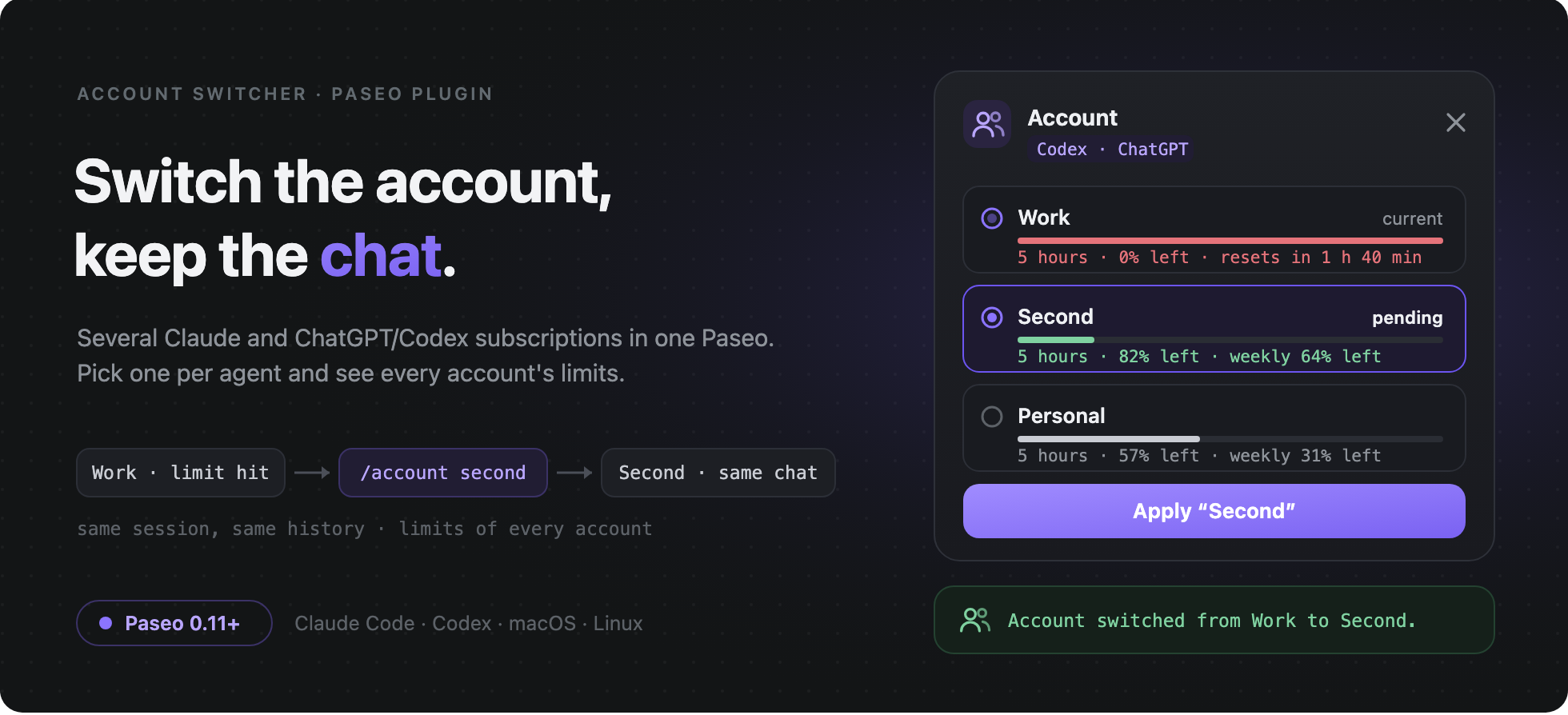
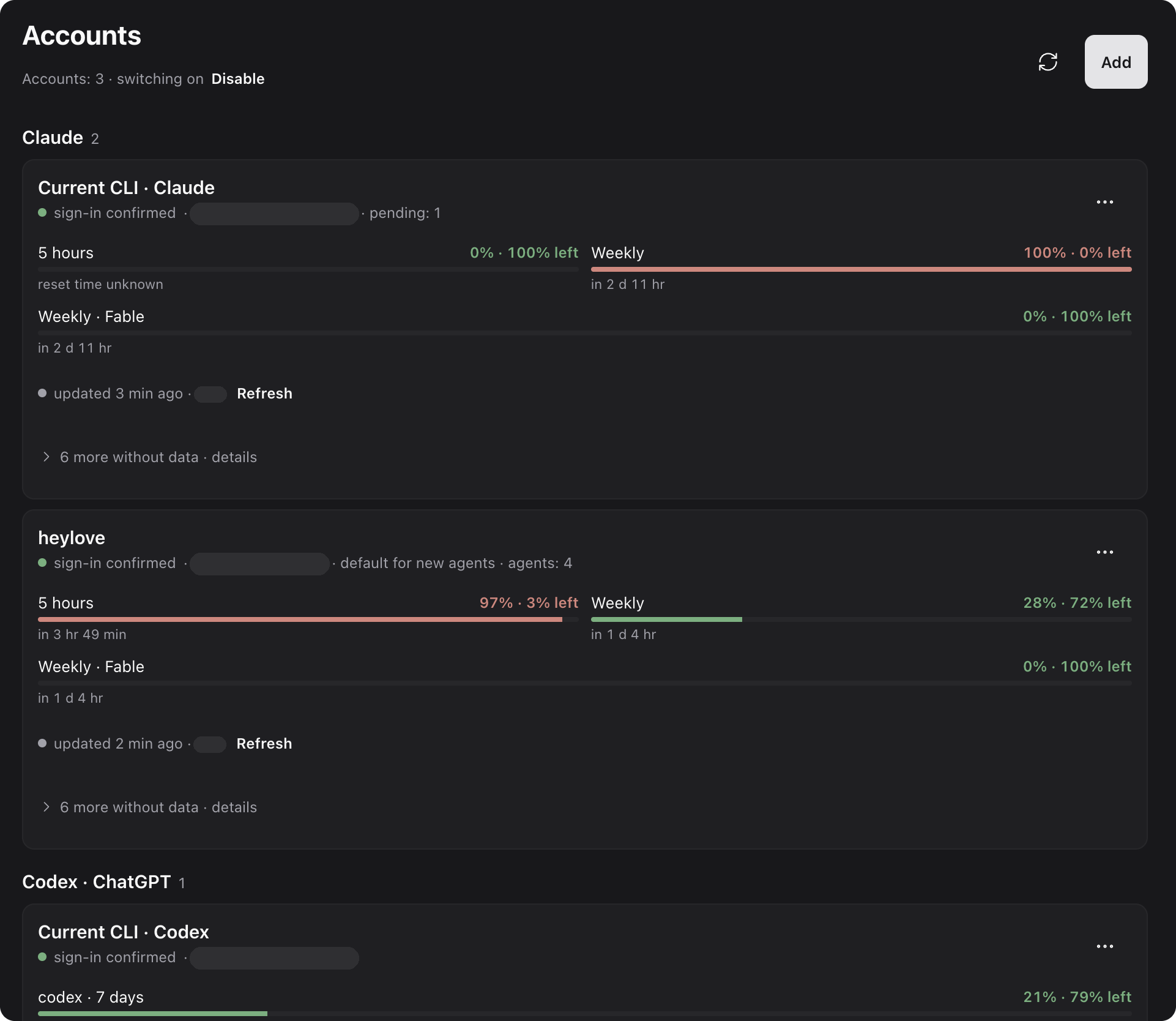
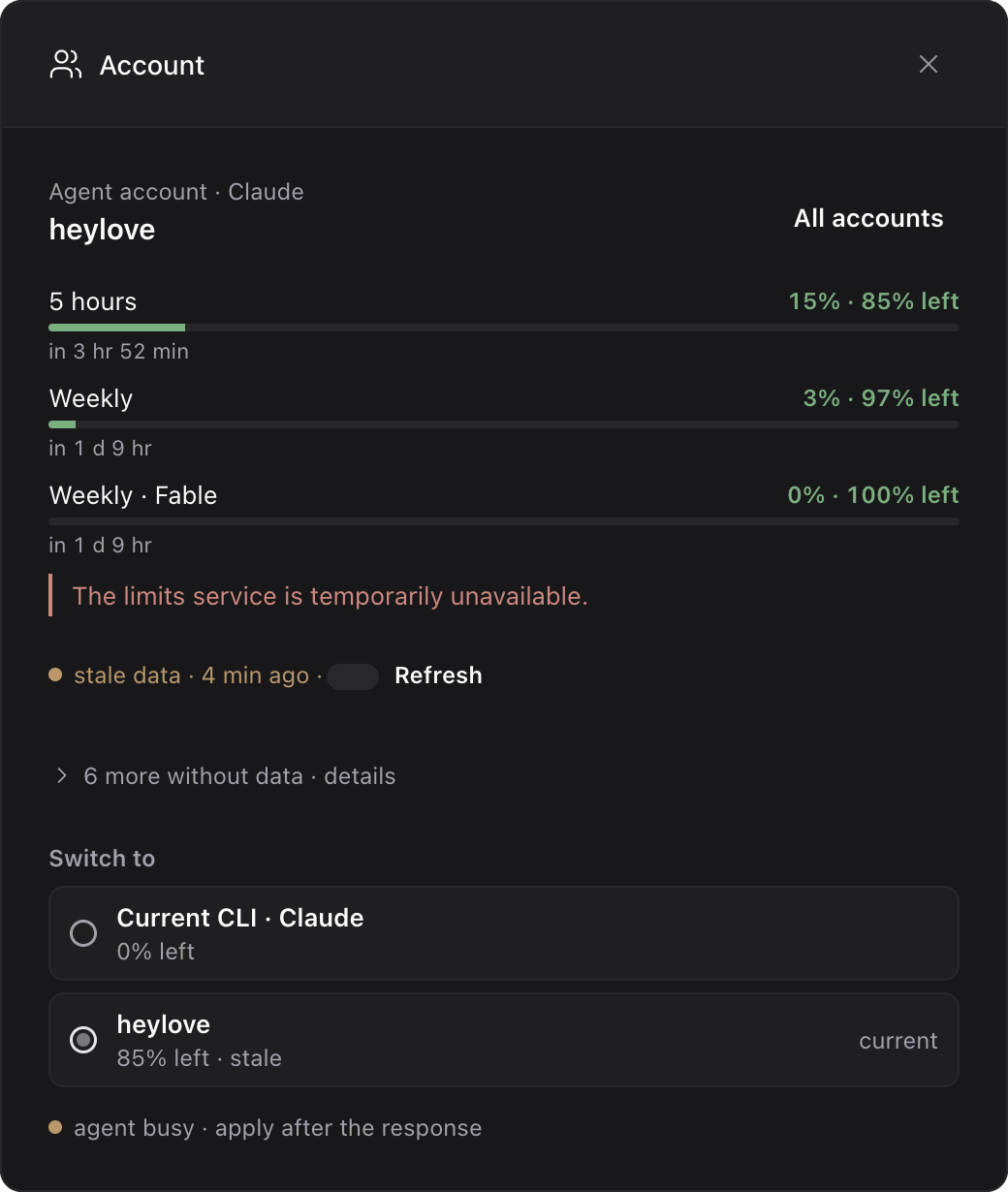
Account Switcher lets you use several Claude and ChatGPT/Codex subscription accounts in Paseo. You pick an account for each agent, switch the account of an existing chat, set a default per provider, and see each account's usage limits. Switching stays within one provider and is manual, unless you turn on automatic switching for when a limit runs out.
Limits cover every window the provider reports, such as 5-hour and weekly use, with reset times. Codex usage-based workspace plans show their monthly credits, and Claude enterprise seats show their monthly spend allowance.
How it works
- Each account you add gets its own credential profile. Settings, skills, and session history stay shared with your existing CLI setup, so a profile is not a sandbox.
- Turn on Account switching in Accounts to point Paseo's Claude and Codex commands at the plugin's launchers, which start the official CLI under the agent's account. Turning it off restores the original commands; do this before removing the plugin.
- Open Manage to check sign-in, refresh limits, rename an added account, or make it the default. Each added account has a visible Remove button with confirmation and an explanation of any blockers. Current CLI entries use the host's own sign-in and cannot be removed here.
- A new agent starts on its provider's default account. When the latest readings show the default has used up an account-wide limit that resets later, Codex reports that ordinary usage is not allowed, its plan lacks the Codex model chosen for the agent, or the default needs sign-in, the agent starts on the signed-in account with the largest percentage left instead. Limits of a single model and extra paid usage do not count. With every account ruled out, it stays on the default. Always use the default under a provider in Accounts turns this off, so the default stays binding.
- A tool that creates agents can name the account to start on: an agent created with
PASEO_ACCOUNT_SWITCHER_ACCOUNTin its environment, set to an account's name or ID, starts on that account whatever its limits. It is not created when that account cannot be used, or when Always use the default is on and that account is not the default. /account namein the message field switches the chat's account, or/account defaultits provider's default: at once when the agent is idle, otherwise in the switcher for Apply. The Command Center offers Make “name” the default for each signed-in account.- A line in the chat records applied switches, and why a new agent did not start on the default. These lines are best effort and do not survive a daemon restart.
- Signed-in accounts also appear in Paseo's Usage view, and Paseo's usage popover for an agent on a managed account shows that account.
- When a turn stops because its account's limit is used up, the chat shows a row with the time the limit lifts and a button such as Switch to Second and continue for the signed-in account with the most room. After the switch the agent is asked to continue. If no other account has room, the row says so. Codex reports such a turn as failed; Claude reports it as completed, so a completed Claude turn is checked when the last reading already shows its account used up, and not while the account's paid extra usage still has room. Each time an account runs out, the chat gets one row, not one per turn. When a limit runs out during a chat under a provider in Accounts can be set to Switch automatically, which switches without the click. The default is Offer a switch. After a completed Claude turn the automatic switch does not ask the agent to continue, since the turn may really have finished; the row says the next message runs on the new account. Automatic switching happens once per turn and at most three times an hour for a chat, and never back to an account the chat left within that hour.
- The account chip in the composer opens the switcher for that chat. A chat changes account only through Apply,
/account name, the switch button of the limit row, or automatic switching if you turn it on, and only while the agent is idle with no pending permission request; Paseo reloads the agent with its session intact. A switch refused before the reload changes nothing. If it fails once the reload has started, the plugin tries to restore the previous account.
Setup
- Paseo 0.11 or newer on a macOS or Linux daemon, with Node.js 22.12 or newer.
- The official Paseo CLI and at least one of Claude Code or Codex on the daemon. A provider without its CLI shows as unavailable; after you install it, reload the plugin and select Enable in that provider's section.
- A Claude or ChatGPT subscription for each account. API keys are not supported. Adding an account runs the official CLI sign-in from Paseo.
What it reads and sends
- It reads each account's stored sign-in: Codex's
auth.json, and Claude's credentials from the macOS Keychain or the profile's.credentials.json. The Codex file identifies the ChatGPT account; the Claude access token authenticates the usage request, and the official CLI reports which Claude account is signed in. Tokens stay on the daemon. Paseo clients receive each account's email, plan, and limits. - Claude limits come from a request to
api.anthropic.comwith the account's access token. When that token has expired, for example on an idle account, the plugin runsclaude -p /usage --no-session-persistenceunder the account so the official CLI renews it, at most every 10 minutes. The command sends no model message and saves no session. Codex limits and the plan's model list come from the officialcodex app-server, which asks OpenAI and may refresh the account's token. Limit checks send no model messages. - To list accounts in Paseo's Usage view, the plugin reports the limits it has already collected under the source name Account Switcher, without new provider requests. For an agent on a managed account, it adds that account's profile directory to the agent's session environment so Paseo's usage popover reads the right account.
- The only message the plugin sends to an agent is Continue., after a switch made from the limit row, or by automatic switching after a failed turn.
- Limits refresh every 5 minutes, and every minute while Accounts or the switcher is open. Missing values show as no data, and a failed refresh can keep the last values, marked stale. With Check usage off in the host's settings (Paseo 0.15 and newer), the plugin makes no limit requests and offers no switch when a limit runs out; Accounts says so.
- Removing a managed account deletes its profile and stored sign-in, including a Claude account's Keychain item on macOS. Shared session history stays.
Limitations
- Apply reloads the agent through Paseo, which has no lock against a message sent from another client at the same moment. That message can be interrupted.
- Paseo does not say why a turn failed, and reports a Claude turn stopped by its limit as completed, so the limit row appears only when the plugin's own limit readings, taken again after the turn, show the account is used up. A limit the provider does not report gets no row, and neither does an agent whose account the plugin cannot confirm. Nothing is offered while account switching is off for the provider.
- Paseo's Usage view can show one managed account twice: after you open the usage details of an agent on that account, Paseo's own Claude or Codex card for the login can appear next to the Account Switcher card. The plugin cannot merge cards of different sources.
- Plans differ in the models they offer: after a switch to a plan without the agent's model, its next message fails. For Codex, the switcher compares the agent's model with the models the account's plan offers and warns before Apply. Claude does not report its models, so there is no such check for Claude.
- Codex's In browser sign-in must finish on the daemon's computer. From another device, use Device code.
- Claude credentials in an inaccessible macOS Keychain show as sign-in unavailable. Unlock Keychain in the daemon's session, then check sign-in again. A daemon started from SSH may not share the desktop's access. If the official CLI cannot renew an expired token, sign in again.
- Providers can change their limit formats. Values the plugin cannot read show as no data.
Other plugins by dutchakdev
- Machine Status: load, memory, disk, the ports and processes your agents started, and Docker on the daemon's Mac, with dev-cache cleanup and confirmed process stops.
- Mermaid: draws Mermaid flowcharts and sequence diagrams from chat messages and
.mmdfiles, on desktop and mobile. - secure-input: agents ask you for secrets through a form, and each value lands in a short-lived file the agent moves without reading it.