
Open in Windows (WSL)
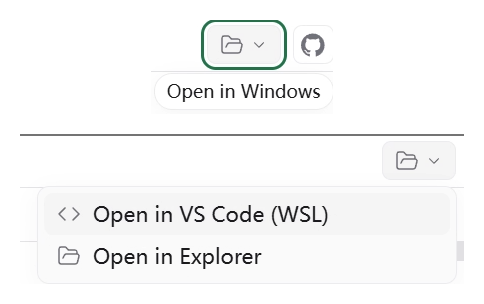
Open a workspace from a WSL daemon in VS Code (Remote - WSL) or Windows Explorer from the workspace header.

该插件的概览尚未翻译为你的语言,因此以英文显示。
Adds an "Open in Windows" button to the workspace header when the Paseo daemon runs inside WSL. The menu opens the workspace directory in VS Code through Remote - WSL, or in Windows Explorer through its \\wsl.localhost path. The same two actions are available from the Command Center as "Open in VS Code (WSL)" and "Open in Explorer".
Paseo Desktop on Windows only shows its built-in open-in-editor button for its own bundled daemon, so a daemon running in WSL gets no such button. This plugin runs the launch on the daemon side through WSL interop, which lets it work from any connected client.
Requires a daemon running in WSL with Windows interop enabled, wslpath available, and VS Code with the WSL extension installed on Windows for the VS Code action.