Follow-up
A Paseo plugin that follows every workspace until the work is done: one Home for what needs you, questions you answer anywhere, and repairs that send themselves.


该插件的概览尚未翻译为你的语言,因此以英文显示。
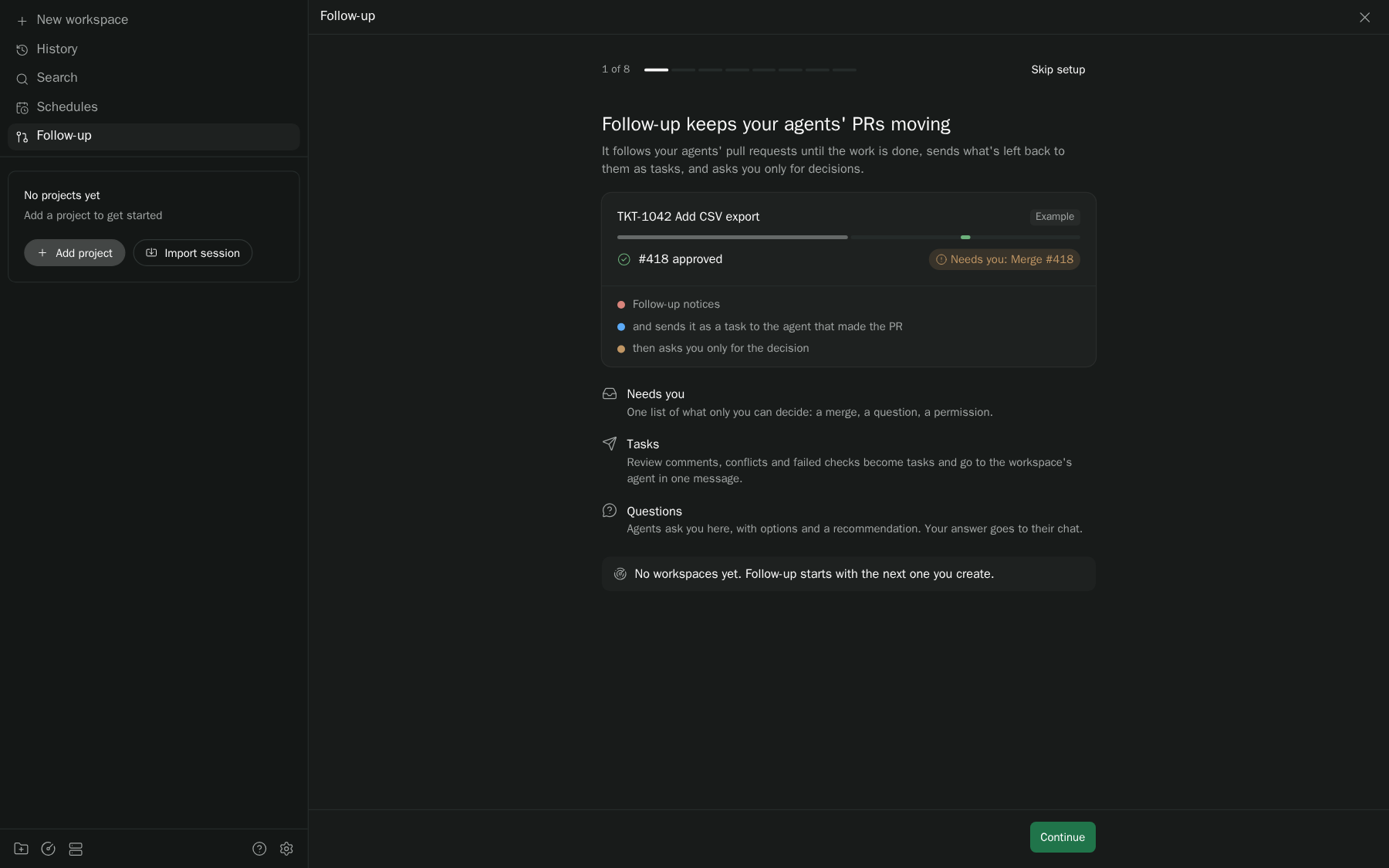
Follow-up watches every pull request a Paseo workspace opens until the work is actually done. It shows each PR stack at a glance, gathers conflicts, failing required checks and review threads into one repair batch for the workspace's main agent, and tells you when something needs you, such as an approved PR to merge, a question the agent asked or a batch to send. Answer a question in Follow-up and the answer goes straight to the agent's chat.
What you see
- Home: every workspace grouped by what it needs from you (Needs you, Sending, Running, Waiting on others, Quiet), with the selected one beside the list so you can allow a permission, answer, merge, reply or sign off in place, and a brief with what Follow-up did while you were away. Above the list: the status counts, provider limits from Smart Session when it's installed, a search over names, branches, PRs, agents and asks, and a sort menu (Priority, Recent, Oldest waiting, Name, By project).
- The Overseer (1.4 beta), pinned on Home: one agent you talk to about all your workspaces. It forwards your asks to the agent that owns them, asks you when it isn't sure, and starts a new workspace only when you say so. You can ask it from Home's search box (the last row, "Ask the Overseer: …") or with ⌘K → Follow-up: Ask the Overseer.
- AI priority (1.4 beta): Home's Priority sort ranked from your Linear issues, Slack DMs and mentions, GitHub review requests and the weekly plan, each row with a one-line reason that names its source. It runs hourly on workdays, only when something changed, and Re-rank now is in the sort menu.
- Summary, a collapsible section at the top of Home's detail pane and the workspace panel: a one-line gist, a short AI overview of what the workspace is for and where it stands, and its linked Linear issues, PRs, Slack threads and docs.
- A workspace panel for the open workspace only, with a Home button: PRs merged, what needs you, what needs fixing, a bar with one segment per PR, and what the agent is doing now. "Open full" on Home docks it beside the agent's chat.
- A Needs you card with one button per decision: Send repairs, Merge, Resume, Retry, or Answer.
- Questions from the main agent, each with a permanent ref (Q1, Q2…), lettered options, the agent's recommendation and what it does while it waits. Pick an option, add a note and Send it to the agent, or Copy it instead. Answered questions stay listed under their ref, and the question mode setting (Stop, Work around, Keep building) tells agents what to do until you answer.
- A Spec link in the header to the page that sums up the workspace, usually the Claude artifact the main agent keeps up to date.
- An Activity card: repairs sent and finished with how long they took, merges, PR actions and questions.
- Each stack drawn top to base, merged PRs folded away, and a sheet per PR with checks, reviewers and Merge.
- Tasks for work that outlives a merge, manual or scheduled after a merge or deploy, with an optional delay.
- A composer pill and a sidebar count that appear only when something needs you; the pill steps through open questions so you can answer without leaving the chat. Home lists every workspace by who is up next, and a larger view opens a workspace in two columns.
- Compact rows for Follow-up's own tool calls in agent chats, a card for each repair batch, and a card when the agent declares Done.
Setup
Requires Paseo 0.15+, Node 22+ and an authenticated gh on the daemon host. Works with plain GitHub; Graphite is optional and picked per repository (Auto chooses Graphite only where the gt CLI is installed, signed in and the repository was set up with gt init). In Graphite repositories Merge uses saved Graphite CLI authentication; elsewhere it runs gh pr merge, and When ready is GitHub auto-merge. Follow-up follows every workspace that has an agent; Settings has per-project and per-workspace exceptions. The optional Send to Paseo browser companion adds Graphite's Merge when ready switch through its existing pairing; it is not needed for anything else.
What it does on its own, and what it never does
Auto-send ("Send repairs automatically") is on by default for every followed workspace; 1.3.0-beta.2 turned it on once for existing ones after backing up the state file. With it off, each repair batch waits for your click; with it on, Follow-up sends batches once the main agent is idle, after fresh permission and Session Guard checks. Follow-up never merges, turns on merge when ready, requests reviewers or archives on its own, and Merge always re-checks the stack and asks again. Done needs the main agent's declaration, settled PRs and tasks, and no open questions. Answers are sent only when you click Send; an answer the agent can't take yet waits and goes out on the next check, and one Paseo didn't confirm waits for you to Resend. An optional recovery agent can rebuild missed PRs and tasks from a workspace's history; it runs only when you start it and never edits code. Deployment checks and reviewer shortcuts exist only for specifically configured repositories; elsewhere deployment stays unknown.
What agents can do for you
Every root agent Paseo launches (tracked or not) gets Follow-up's action tools: list_prs, add_reviewers, merge, enable_merge_when_ready, disable_merge_when_ready, send_repairs, set_auto_send, clear_hold, retry_batch, track, inbox_list, sign_off, snooze, set_finish_flags, set_priorities, set_wait_for_jobs and the read-only workspace_about (a workspace's overview and linked items) and release_notes (the installed version and its notes), updates_status and check_updates (Settings → General, Check now), with set_updates and install_update as confirmed plans (external priorities for Home's Priority sort, kept in plugin-data/follow-up/priorities.json). Each runs the server path its button runs, with the same guards (tracked workspace, hold, PR eligibility, merge blockers), across every tracked workspace, so an orchestrating agent can act "on all" when you ask it to. Tools that act on a list, and merge, return a dry run and run only with confirm: true and that plan's id; merge is marked destructive and the list tools read-only. Inbox tools act on other agents only: an agent can't sign itself off. Recovery agents, contributors and subagents never get them, and the daemon re-checks the caller on each call. Each agent action is kept in the inbox's delivery ledger as by: "agent:<id>"; it never counts as you writing to an agent. A sign-off is still a sign-off made on your behalf, so it clears the flag. There is no tool to untrack or archive a workspace, or to put one on hold, because Follow-up has no button for those either.
Data and access
This is a trusted, unsandboxed plugin. It reads workspace metadata, saved agent history and configuration, GitHub status and existing CLI authentication, and keeps its state in plugin-data/follow-up on the daemon host. It attaches scoped agent tools per session (served by Paseo's own MCP as follow_* on Paseo 0.15+, a per-launch stdio bridge otherwise; never a global MCP registration, and it removes the user-scope follow-up entry older versions wrote, keeping a .follow-up-unregister.bak of each file) and reversible provider hooks for tracked sessions and, while the Needs-you inbox is on, the needs_you tool and its Stop-hook nudge for root agents (see below). To find the spec link it reads completed Claude Artifact publish results in the workspace's root sessions, never page content, chat links or the repository; a link you set wins over the agent's, which wins over detection. Repair prompts go to your configured agent and provider. For the provider meters it calls the Smart Session plugin's smart-session.subscriptions and smart-session.budget RPCs at most once a minute, or reads the newest rows of its plugin-data/smart-session/accounts-YYYY-MM.jsonl; it never asks ZeroSub to refresh or switch. It has no Slack identity and no background channel scanning; replies to stakeholders need your authorization and a sent-message receipt from the agent.
Follow-up reads Paseo's agent, workspace and project lists into one in-memory directory shared by discovery, runtime checks, the Needs-you inbox, the Overseer and every client RPC. It reads the lists once at start, then patches the directory from lifecycle events: turn started or ended, permission requested or resolved, agent created, closed or archived, workspace created or archived. A change marks it dirty, and a dirty directory re-reads at most once a minute; a clean one re-reads every ten minutes. Before anything that would load an agent (a timeline or provider-subagent read), Follow-up re-reads that one agent, because the cached copy may predate Paseo unloading it. Provider subagents are asked about only when a send is due or waiting for acknowledgment, or completion is being checked. The Done label is sent only when it changes. In the app, the panel, the larger view and the pill draw from the client's shared workspace poll, which runs every 15 s plus a refresh shortly after Paseo reports an agent change. The inbox runs the same way and passes the tag of the list it holds, so an unchanged list comes back empty. Display preferences re-read once a minute. None of these poll while the app is hidden.
The PR workflow setting lives in plugin-data/follow-up/pr-workflow.json (owner-only): the default, per-repository overrides, merge methods and the review-fix instruction. Auto-detection reads only files: PATH for a gt executable, <config>/graphite/user_config, <config>/graphite/auth, then ~/.graphite_user_config for a sign-in token's presence (<config> is $XDG_CONFIG_HOME or ~/.config) (never sent anywhere by detection), and <git dir>/.graphite_repo_config in the checkout of the repository's Paseo project, then in the working directories of tracked workspaces with PRs in that repository (from the agent list Follow-up already has). It never runs gt and caches for ten minutes. Repositories that resolve to GitHub get no Graphite API calls; their readiness, merge method and auto-merge come from the same gh api graphql query that already reads each PR, so there is no extra polling. The first start with this setting seeds the review-fix instruction to /fix-pr when ~/.claude/commands/fix-pr.md or ~/.claude/skills/fix-pr/SKILL.md exists, once.
Reviewer lists live in plugin-data/follow-up/reviewers.json (owner-only), apart from state.json. Each list is per repository, plus a default for repositories without one, and each user keeps their own. Collaborator and team suggestions are read with gh api only when you open Add reviewer. They are cached for ten minutes, and never polled.
The Needs-you inbox (beta) keeps one flag per root agent in plugin-data/follow-up/inbox.json. When a turn starts it reads the newest user message from the agent's recent timeline to tell your messages from automation, and it reads, never writes, Defer's plugin-data/defer/queue.json, Smart Session's plugin-data/smart-session/compactions.json, Session Guard's plugin-data/session-guard/state.json and Paseo's schedule records. An unknown or unreadable format counts as your message, which clears a flag rather than adding one. Signing off also clears Paseo's own unread dot for that agent. The first-run import and the restart check read only Paseo's agent list: an agent's last activity is its unread time or your last message to it, never Paseo's updatedAt (which the daemon rewrites in bulk), and they don't fetch timelines, which would load every agent. Closed and archived agents are never imported. Turning the inbox off stops all of this.
The brief (beta) is stored on the agent's inbox entry and appended to its timeline as a Follow-up row; re-appending replaces that row, and the restart check ignores the updatedAt change the append causes because it never reads updatedAt. To build a brief Follow-up reads only what it already has: the agent's needs_you call, the permission request's title, the failed turn's error message, Session Guard's note and reset time for a paused agent, and its own PR state. It does not read or quote the agent's reply. While the inbox is on, every root Paseo agent on Claude Code or Codex gets Follow-up's MCP bridge with the needs_you tool only (tracked main agents keep their full set), and plugin-data/follow-up/brief.json records whether the inbox and the nudge are on and which agents have a permission prompt showing. Clicking an option or Retry sends one message as you; it is logged in the delivery ledger as yours, so it clears the flag. The Stop hook, part of the same reversible provider hooks Follow-up already installs, now also runs for those root Claude Code sessions: if the turn ended without needs_you, it blocks the stop once with a one-line request to call it, records that it did in hook-state, and never blocks the same turn again. It reads brief.json, its own per-turn marker and the time of the agent's last needs_you call, and nothing else. Turn it off with Ask agents to state what they need; turning the inbox off stops it too.
The Overseer (beta) is one Claude agent in a Follow-up workspace under plugin-data/follow-up/overseer-home, labelled follow-up.overseer=1 and created only when you click Start. Its id is kept in plugin-data/follow-up/overseer.json. Discovery, tracking, auto-send and Needs you skip its workspace. At the start of each of its turns, the provider hook adds a digest from plugin-data/follow-up/overseer-digest.json and records what it showed in hook-state/overseer-seen-<agent>.json. The worker builds that file when the Overseer's turn starts (and every 10 minutes as a backstop), from Paseo's workspace list (metadata only, at most once a minute) and Follow-up's own state; the hook waits up to 1.5 s for that turn's build. It skips the build while the resource governor pauses background work. Its tools are workstreams, agent_digest, route_candidates, send_to_agent and start_workspace. For an agent that isn't loaded, agent_digest reads the provider's transcript on disk, read-only (Claude Code's projects/<cwd>/<session>.jsonl, Codex's sessions/**/rollout-*-<thread>.jsonl; only the last 512 KB, and never the credentials in Paseo's agent record). Without a transcript it uses Follow-up's goal and PR titles. It never reads that agent's timeline. send_to_agent writes your words to the delivery ledger first: as yours only when they answer that agent's open ask, otherwise as Follow-up's. It wakes a resting agent only because you asked for it. start_workspace runs only after your approval, through a dry run and confirm. The Overseer can't merge, archive or post anywhere.
The Summary keeps its overviews in plugin-data/follow-up/about.json (gist, overview, linked rows, when and from what; never raw history) and logs each model call's duration and cost to ai-jobs.jsonl. To write one it reads the root agent's latest steps from its live timeline only when Paseo already has the agent loaded; otherwise it reads the first and last part of the agent's provider transcript on disk (Claude Code's ~/.claude/projects, Codex's ~/.codex/sessions), read-only, and never wakes the agent. It reads subagent titles from Paseo's agent list, PR titles and bodies with gh pr view, and only the Linear issues and Slack threads the workspace itself links, through mcpproxy call tool-read (linear:get_issue, slack-user:slack_read_thread); there are no searches. The model is set under Settings → Agents (default Haiku). With Claude it runs as a headless claude -p with no tools, no MCP servers, no settings and no saved session. With Codex it runs as codex exec --ephemeral with no user config or rules, no shell tool and a read-only sandbox in an empty temporary folder. Either way it gets one turn, a 90-second timeout, and runs one call at a time; on timeout the whole process group is killed. Overviews are written ahead of time only for non-dormant workspaces in Needs you, at most 60 a day by default (Settings → Agents), and not while a Claude account is above 85% of a limit or the resource governor has paused background work; above its higher threshold, opening the section shows the cached overview and writes none.
Settings → Agents (plugin-data/follow-up/agents.json, its own file) chooses the provider, model, effort and mode for Summaries, the Overseer, recovery agents and the priority ranker. Missing or invalid entries use the defaults. The provider and model list comes from Paseo's provider snapshot. It is read only when that settings screen opens, and cached for ten minutes. A changed Overseer setting is never applied mid-conversation: Home offers a restart, and the new Overseer is handed the old one's last steps (read from its transcript on disk when it isn't loaded). The old agent is left as it is. A recovery agent on a different provider than the main agent keeps the main agent's system prompt, MCP servers and tool policy, and drops its provider-specific model, mode and options. FOLLOW_UP_OVERSEER_PROVIDER ("provider/model") overrides the Overseer's setting; it exists only for isolated test daemons.
The ranker behind AI priority (beta) runs inside Follow-up's worker as bounded one-shot jobs (Claude or Codex, per the ranker role) through the shared job runner (server/ai-jobs.ts), one at a time and only while the resource governor allows background work. It reads Follow-up's own state, mcpproxy call tool-read for linear:list_issues (assigned to you) and slack-user:slack_search_public_and_private (DMs and mentions, last 48 hours), gh search prs --review-requested=@me, and the planning artifact through one Claude turn limited to the Artifact tool. It hashes those inputs and calls the model only when they changed. It writes only plugin-data/follow-up/priorities.json (its ranking, which replaces its previous one) and ranker.json (input hash, run count, source health, the day's plan summary, and Linear issues no workspace covers). It never stores raw artifact HTML or share keys. The provider, model, cadence and daily cap come from the ranker role in Settings → Agents; the plan reader always uses Claude, the only provider with the Artifact tool.
Wait for background jobs (1.4.0-beta.24, folded in from the standalone paseo-wait plugin) attaches wait_prepare_job, wait_for_job and wait_get_job to every interactive Claude session as native plugin tools, with CLAUDE_CODE_MCP_AUTO_BACKGROUND_MS=0 in that session's environment (Claude Code then never backgrounds a long MCP call, Wait's or another's) and FOLLOW_UP_WAIT=1, which makes the provider hook add Wait's guidance once at SessionStart. It keeps job records in plugin-data/follow-up/wait/jobs/<agentId>/<jobId>/ (job.json, a started marker and the exit receipt result.json) and a shell runner, wait/run-job.sh, that the agent's own Bash tool runs; the worker never runs the command. A job is readable only by the agent id and working directory the daemon reports for the caller. A wait holds two timers and refreshes that one agent at most once a second to notice a new message, and only while it waits. It is off when Settings → Agents says so (enable_wait: false in agents.json), when Paseo's config.json lists the standalone paseo-wait plugin as installed and not disabled, when the host doesn't serve plugin tools, and for agents labelled follow-up-wait/enabled=false, paseo-wait/enabled=false or plugin-tools/enabled=false. Records are never deleted automatically.
Getting started keeps only its own progress in plugin-data/follow-up/onboarding.json: whether this host was a fresh or existing install when this version first started (existing if state.json, inbox.json, reviewers.json, agents.json or brief.json was already there), the current step, and whether the existing-install offer was shown or dismissed. An unreadable file counts as finished, so setup is never forced. Its choices are written through the same RPCs and display settings the Settings screen uses. The readiness checks run only when setup asks for them, at most once a minute unless you press Check again: gh api user on the daemon host, Paseo's provider snapshot (the same cached read Settings → Agents uses), Paseo's config.json, and the count of hook-state/native-*.json files. They never read an agent's timeline.
Updates (Settings → General) talk to the npm registry Paseo itself uses (npm_config_registry, else registry.npmjs.org): one abbreviated-metadata request with an ETag about every six hours (none when updates are Off), at most one a minute when Settings opens, one per Check now, and, once per new version, two for its provenance (the version document and its attestations) and one download of its tarball, checked against the confirmed checksum, to show its release notes before installing. Nothing about the host or its agents is sent. Choices, the waiting update and provenance verdicts live in updates.json, the last registry answer in registry.json, and each install step in updates.jsonl. Installing writes update-watchdog.mjs and starts it as a detached node process with the daemon's connection details in its environment (never on the command line); it previews and applies the update through Paseo's own plugin-update calls, pinned to the checksum Follow-up checked, then reads Paseo's plugin list every 15 seconds and the new worker's heartbeat.json for ten minutes, rolls back the same way if needed, and exits. Waiting for a quiet moment uses the cached agent list and turn events, with one fresh agent list right before installing; it never reads timelines.