Find in Files
Search workspace content from the Explorer pane and preview matches.

该插件的概览尚未翻译为你的语言,因此以英文显示。
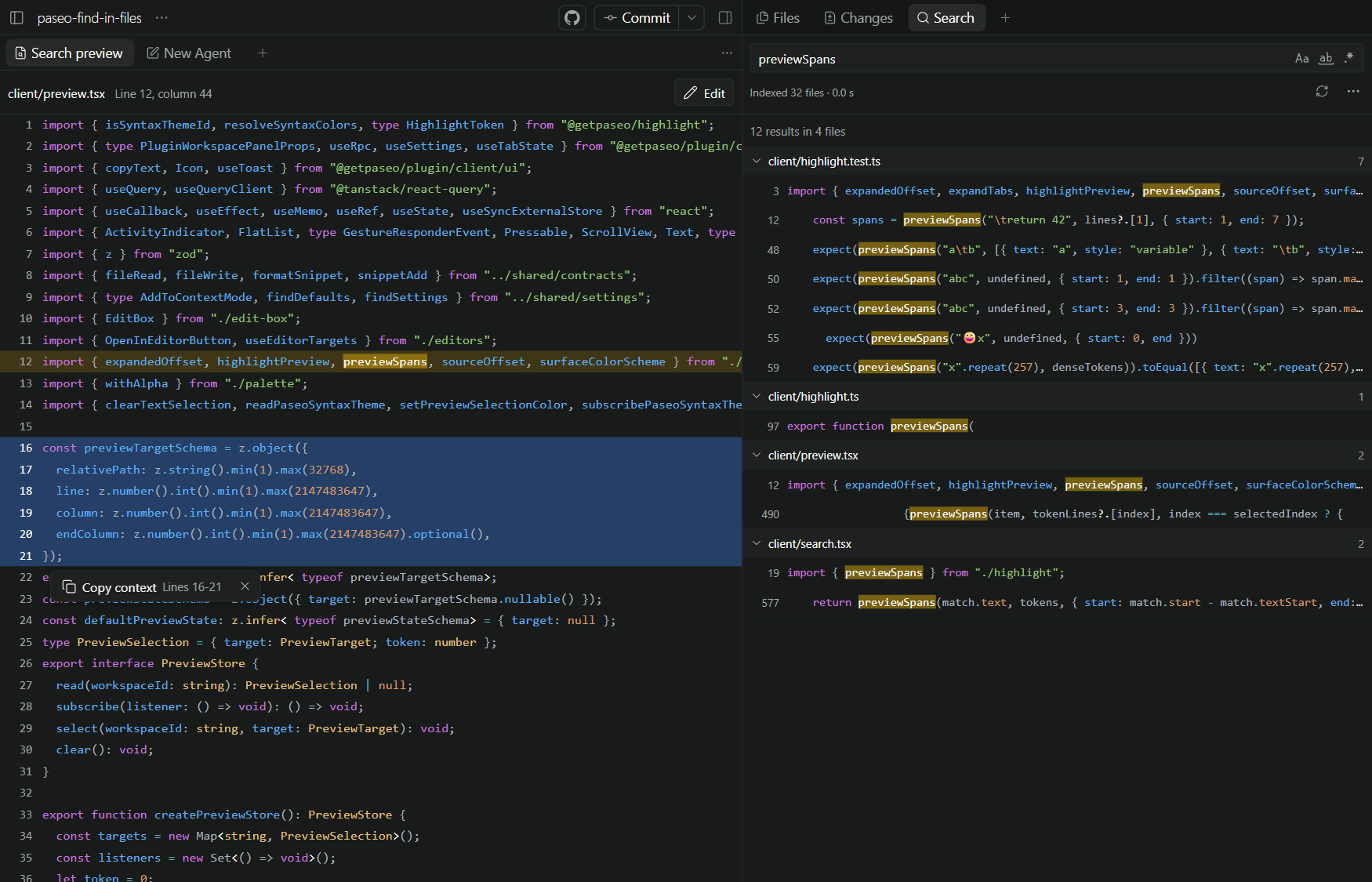
Find in Files adds a Search tab beside Files and Changes in the Explorer pane. Search workspace files, preview a match, add code to an agent's context, and edit the file in place.
The plugin builds a content index in the background. The status row shows its progress and offers a Rebuild index button. Searches use a direct scan before the index is ready. The plugin watches files for changes and keeps the index in memory until a plugin restart.
Workspaces in one repository share its index. Searches stay inside the workspace folder and include nested repositories and submodules. Nested worktrees remain separate, which prevents duplicate results.
Automatic indexing stays off for home directories, file system roots, and workspaces inside a OneDrive root until you select Build index. The file walker excludes OneDrive cloud roots unless the workspace itself is inside one.
Use literal text or a regular expression. Match case, match whole words, and use include or exclude globs to limit files. The file walker respects nested .gitignore and .ignore files. It does not follow symbolic links. Query options and the preview target remain in each tab after a reload.
Preview keeps indentation, expands tabs to four columns, and colors syntax with the Paseo engine. It uses the syntax theme from Paseo Settings > Appearance on desktop and web. Native clients use the Paseo default theme. Files that exceed the syntax budget remain plain text.
The plugin requires Paseo 0.14.0 or later. Search runs inside the plugin and requires no external search program or setup step. The daemon supports Windows, macOS, and Linux. The client uses the Paseo theme and supports compact layouts.
Search reads files on the daemon machine. Results and preview text go to the connected Paseo client. An agent receives a selection only when you attach it to a message. Search and preview skip files above 1 MiB and binary files. Small remote placeholder files can still download when read. Each search stops at 2,000 matches and also limits total result size. Match verification stops after 15 seconds.
The index has a memory limit. A partial index checks files that it does not contain directly. Results arrive together after the search, not as a stream.
Select or drag over line numbers, or drag over code, in the preview. A floating button appears. Depending on the plugin setting, it attaches the selection to the composer (Attach to chat), copies it to the clipboard (Copy context), or does both. Attachments stay in daemon memory until a restart. Select Edit to change the file in a plain text box. Save refuses to overwrite a file that changed on disk unless you select Overwrite.
The preview header has an editor button like the one in the Paseo workspace header. It opens the file at the match line and column in Cursor, VS Code, a JetBrains IDE, the file manager, or another editor that Paseo desktop finds. The button shows only in Paseo desktop for its own local daemon. Result clicks cannot open Paseo's own file tab yet. See Paseo pull request #7318.