Inbox
Replaces the sidebar with an email-style inbox of agents: archive when done, snooze, pin

该插件的概览尚未翻译为你的语言,因此以英文显示。
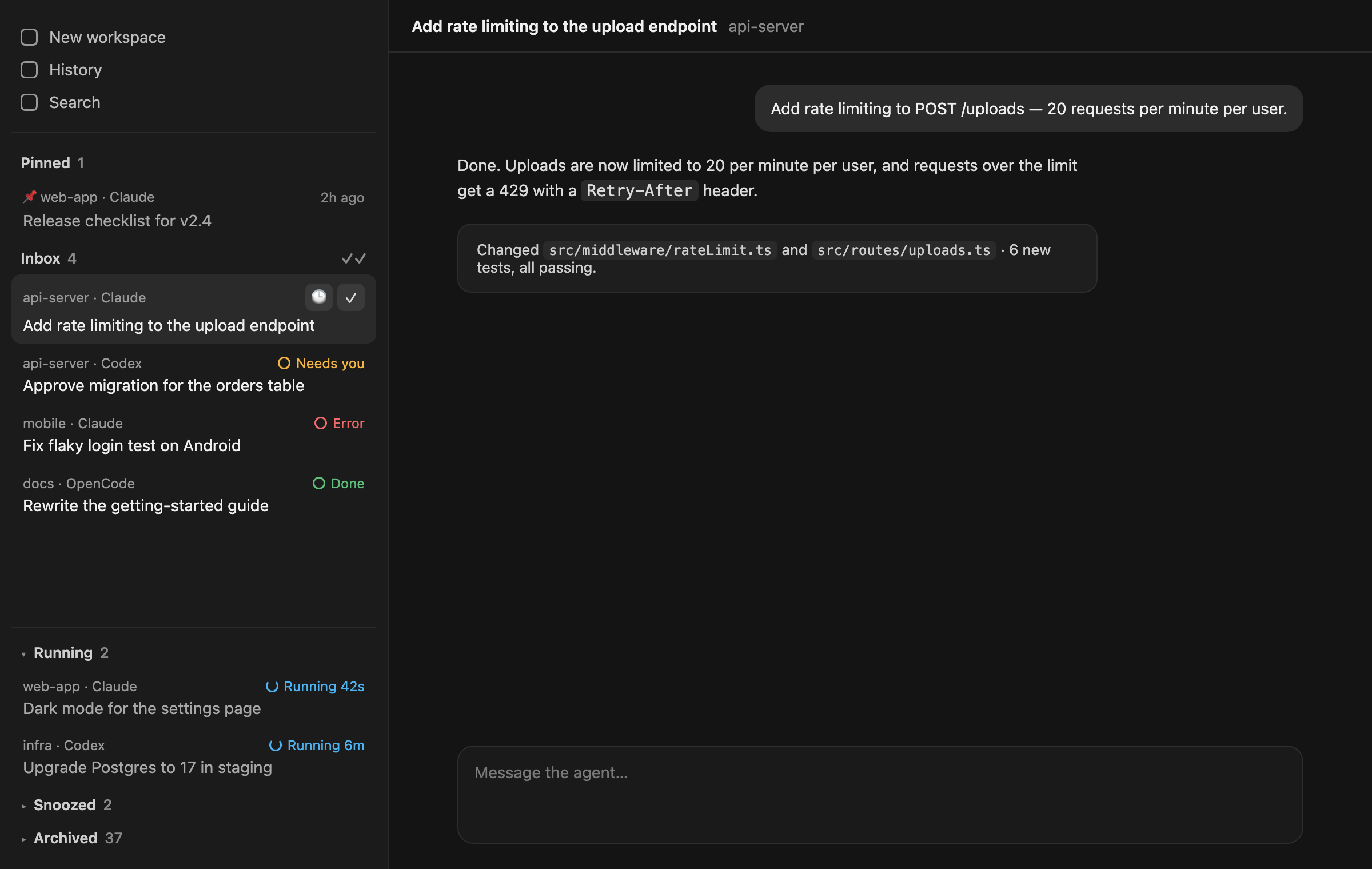
Inbox replaces the Paseo sidebar with an email-style inbox of agents, modeled on t3code's inbox mode. Agents that need you stay at the top; when you are done with one, archive it.
Sections
- Pinned: agents you pinned. Always on top and never auto-archived.
- Inbox: agents that finished, failed or are waiting for approval, newest first.
- Running: agents that are working and not waiting for you. A 2-second grace period after a turn ends keeps rows from jumping between turns.
- Snoozed: agents you snoozed. When the snooze ends they return to the inbox as unread. A failure or approval request wakes them early; simply finishing does not.
- Archived: agents you archived, plus read agents with no activity for 7 days. An agent returns to the inbox when it starts running again or needs attention.
Running, Snoozed and Archived are drawers at the bottom of the sidebar, collapsed by default.
Done means archived
As in t3code, there is no separate "mark as read": the ✓ (done) action archives the agent. Unlike t3code, opening an agent changes nothing; its Done status stays until you press ✓.
Rows
The first line shows the project name (with a pin icon when pinned; click it to unpin) and a status on the right: Needs you (amber), Running with elapsed time (blue, spinning), Failed (red), Woke, or Done (green: finished and not yet handled). Without a status it shows how long ago; snoozed rows show time until they wake. The second line is the title. Running and handled rows are dimmed so rows that need you stand out.
Actions
- Hover a row to swap its status for two buttons: snooze and done (archive). Archived rows offer "Move to inbox"; snoozed rows offer "Wake now". On mobile, long-press a row.
- Snooze presets: in 1 hour, in 3 hours, tomorrow 9:00, next Monday 9:00, each with its wake time, plus a custom number of hours or days.
- Archived shows 10 rows at first; the arrow at the bottom shows 25 more each time.
- ✓✓ next to the Inbox heading archives everything in the inbox.
- ⌘K has "Inbox: …" commands for the current agent, including pin and unpin.
- Slash commands:
/snooze 1h|3h|tomorrow|monday|5h|2dand/settle.
Setup and limits
Enable it under Settings → Sidebar view → Inbox. It works per workspace and covers top-level agents only; subagents and background helpers are left out.
State is kept by the plugin's server side in ~/.paseo/plugin-data/paseo-inbox/state.json on the daemon host. It never writes Paseo's agent data and sends nothing to agent providers or any other service. Events are recorded while no client is open, and state syncs across all connected clients.
Paseo does not distinguish an agent asking a question from one waiting for approval, so both wake a snoozed agent early.