
Issues Workspaces
Paseo plugin: browse a project's open GitHub issues and create a worktree workspace for one, optionally with an agent working on it.

该插件的概览尚未翻译为你的语言,因此以英文显示。
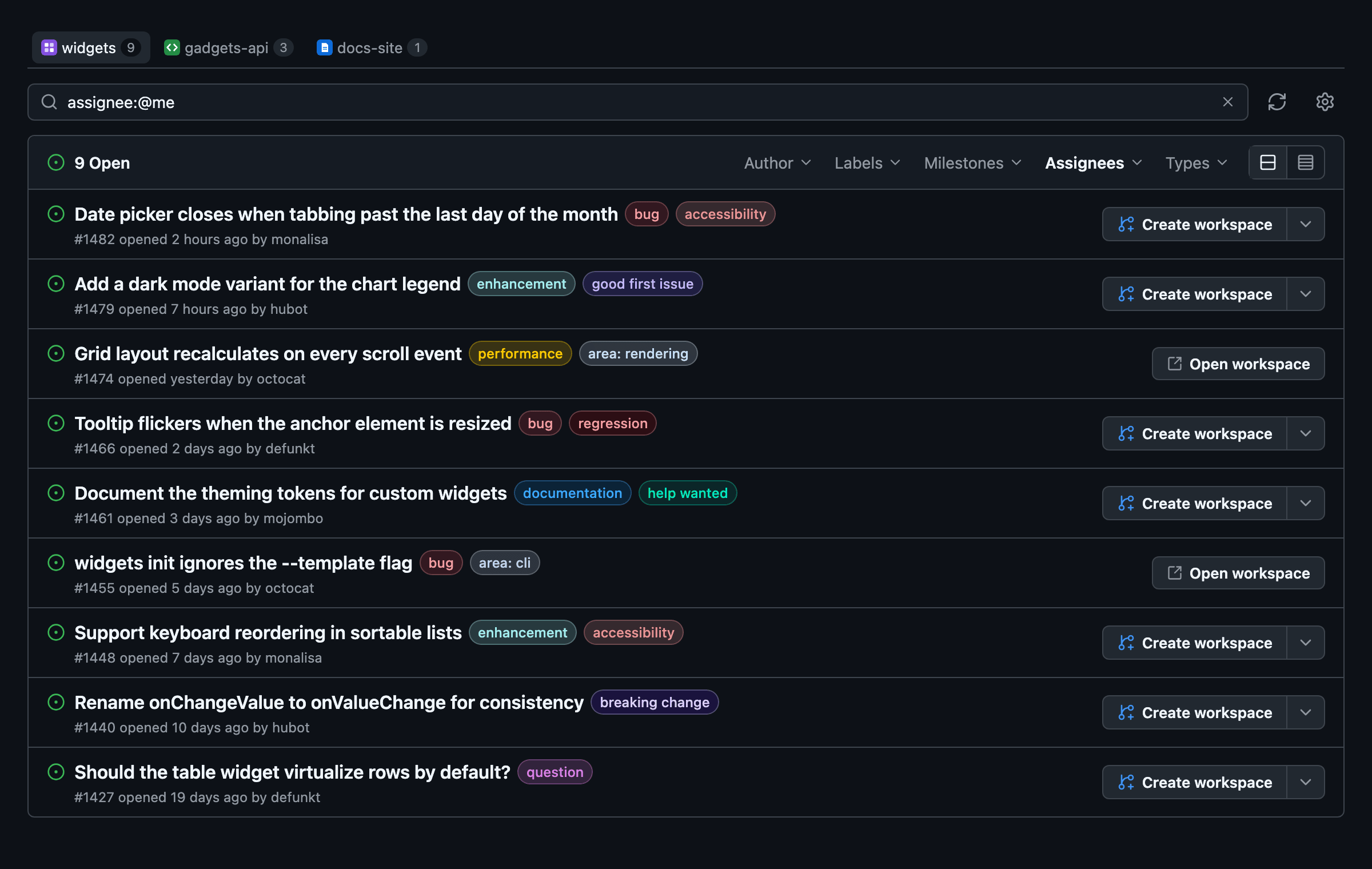
Issues Workspaces lists a project's open GitHub issues, laid out like GitHub's issue list, and creates a workspace for any of them with one press. It can also start an agent in that workspace with a prompt to work on the issue. Open it from the sidebar or the Command Center.
The screen
When you have more than one GitHub project, a row of tabs at the top picks the one to show, each with the project's icon from Paseo and the number of its open issues assigned to you. Below it are the search box and that project's issues, newest first, 25 to a page with GitHub's pager. Each page is fetched from GitHub when you open it.
The search box takes GitHub's issue search syntax and starts with assignee:@me. is:issue state:open is always part of the search, so only open issues appear. Try label:bug, author:octocat, no:assignee, or NOT iOS in:title to leave out issues with a word in the title; clearing the box lists every open issue.
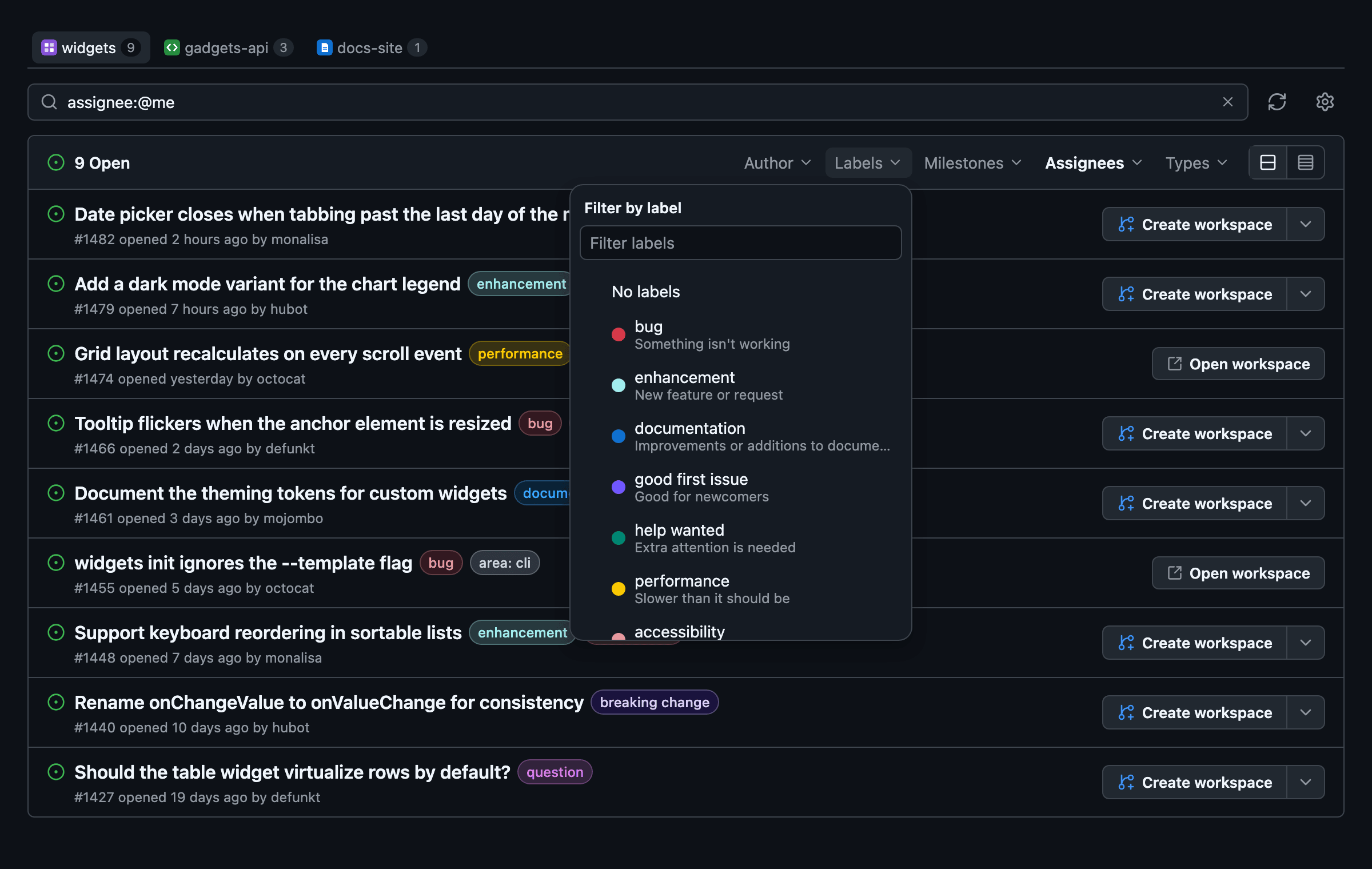
As on github.com, the table's header shows the open count and the Author, Labels, Milestones, Assignees and Types menus, filled from the project's repository. Picking an entry edits the search, so the box always shows what is applied. The header also switches between a comfortable and a compact density.
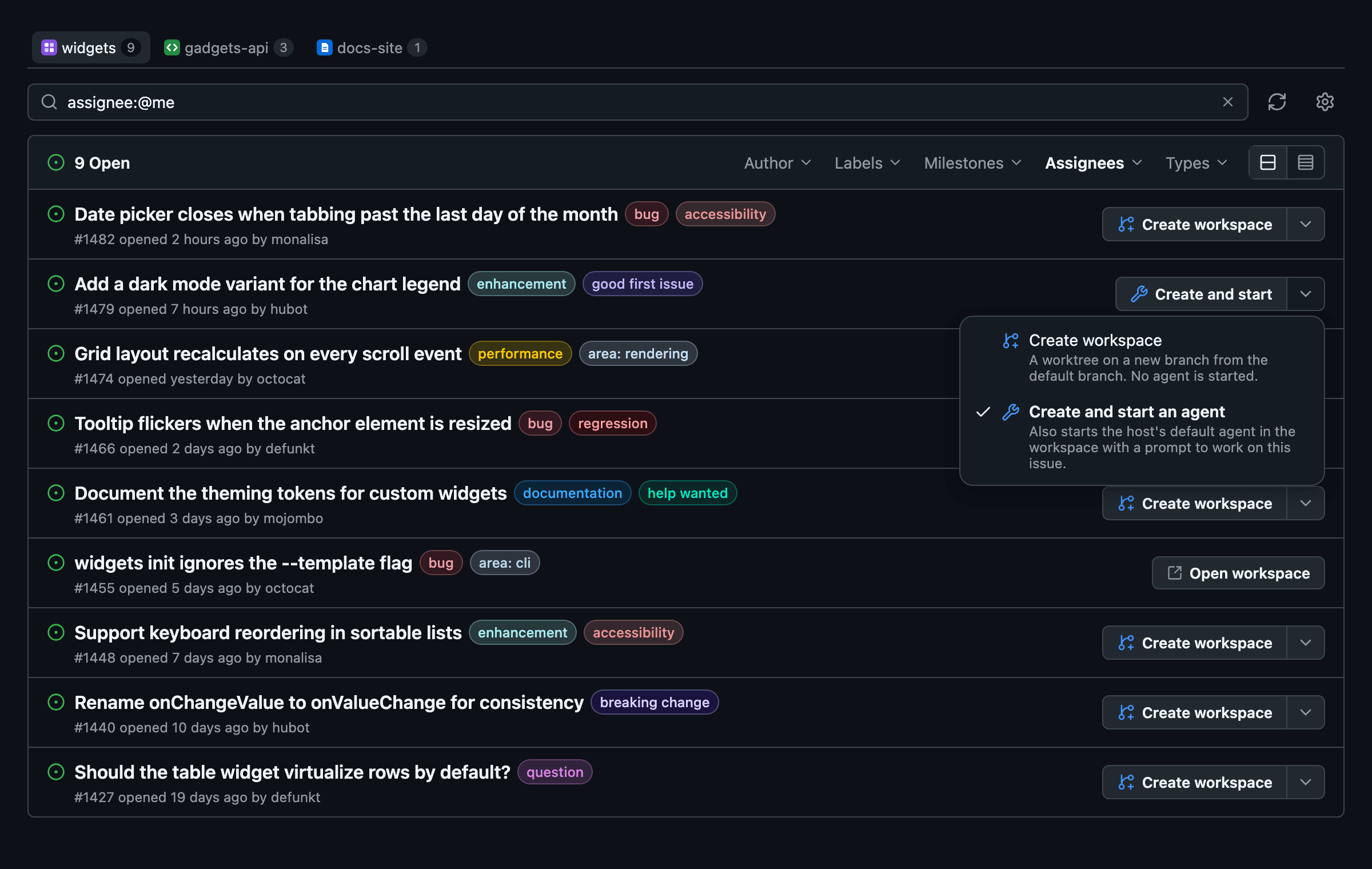
Each issue shows GitHub's label colors and a Create workspace button, or Open workspace when a workspace already covers it. As with GitHub's split buttons, the arrow beside Create workspace picks what the button does: Create workspace or Create and start an agent. Both actions open the new workspace after creation succeeds. Tapping an issue's title opens it on GitHub.
On wide screens, issues, pull requests, and workspace actions occupy separate columns. The PR column shows one PR's review and merge status, prioritizing open PRs with requested changes or merge conflicts. An additional-PR count opens the complete list in a popover, so extra PRs do not make the row taller. Selecting the status also opens the details; selecting a PR number opens GitHub. Narrow screens stack the columns and use a sheet for PR details, as do native clients. Draft, merged, and closed PRs are identified, as are PRs waiting in a merge queue.
Links come from closing references such as Closes #2, manual links in GitHub's Development section, and PR references recorded in the issue's timeline, including plain issue mentions. Branch names alone do not count. PR status loads separately so an unavailable lookup does not block the issue list or workspace actions. It refreshes every minute while the table is active, and with the Refresh button.
How it finds projects
The plugin looks at every git project on the host and reads its remotes. A project is included when a remote points at github.com. When a project has several remotes, it uses the one picked with gh repo set-default, then upstream, then origin, so a fork shows the upstream repository's issues. Projects without a github.com remote are left out. Several projects on the same repository, such as a checkout and a linked worktree, appear once, under the main checkout.
A new workspace is a worktree titled #<number> <issue title>, on a new branch issue/<number>-<slug> taken from a freshly fetched copy of the repository's default branch. Create workspace starts no agent. Create and start an agent also starts the chosen agent in the new worktree and sends it the agent prompt as its first message.
An issue counts as covered when a workspace in any project on the same repository has a title starting with #<number>, or a branch that starts with the branch prefix and the number, or contains <number>- after a slash. When a local branch exists for an issue but no workspace does, for example after archiving one, the plugin shows the branch and does not create a second one.
Other hosts
With several hosts connected, the project tabs also offer GitHub projects that only another online host has, labelled with that host's name; their issues are searched with this host's gh, and the other host needs neither this plugin nor gh. Creating a workspace for one of those issues creates it on that host. This host cannot run git there, so the worktree branches from that host's last-fetched copy of the default branch on origin, and leftover local branches there are not detected. Create and start starts the configured agent when that host has it ready, otherwise that host's default, at the configured effort when that model offers it. An issue in this host's projects that already has a workspace on another online host shows a link to it.
Setup
Each daemon host needs the GitHub CLI (gh) installed and signed in with gh auth login, using an account that can read the repositories. Requires Paseo 0.11.2 or later.
Settings
Open the settings with the gear button next to the search box, the Issues Workspaces settings item in the Command Center, or Settings → Plugins:
- Branch prefix: the start of new branch names. Defaults to
issue/. - Agent: the provider and model that Create and start an agent starts. Automatic uses the first ready provider and its default model.
- Effort: how hard that agent thinks, from the levels the chosen model offers, such as low, medium or high. Model default uses the model's own default, as does a level the model does not offer.
- Agent prompt: the agent's first message.
{number},{title},{url}and{repo}are filled in from the issue. The default asks the agent to read the issue withgh, fix the root cause with tests if it reports a bug or otherwise do what it asks, and summarize the change.
The selected project, search and density are saved with these settings. Settings are stored on each host and shared by every client connected to it.
Access and limits
The plugin runs gh and git on the daemon host as the signed-in user. It reads issues, linked pull requests, labels, milestones, assignable users and issue types from GitHub and never writes to GitHub. Creating a workspace runs git fetch for the default branch and creates a local branch and worktree.
Create and start an agent puts the issue's title and URL in the agent's first message, and the default prompt has the agent read the issue and its comments. Anyone who can open or comment on issues in the repository controls that text, so for public repositories review the agent prompt and the agent's permissions before using it.
Only github.com is supported; GitHub Enterprise remotes are skipped. Issues come from GitHub's search API, which returns at most 1,000 results per search (40 pages) and allows 30 searches a minute; each page you open is one search, and a page seen in the last minute is reused.