Local decider
Paseo plugin for local-decider: auto-allows routine permission prompts, routes new agents to models and flags turns that need you, using a local decision model.

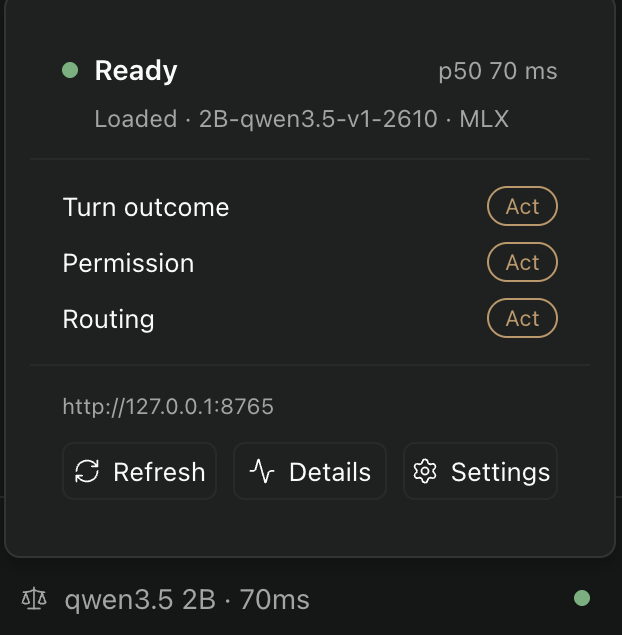
Local decider sends routine, fixed-choice decisions in Paseo to a small decision model on your own machine, through the local-decider gateway. It classifies how each agent turn ended, triages tool permission requests, and can pick a model for new agents.
How it works
The plugin is a thin client; it never runs a model. The daemon side calls the gateway (default
http://127.0.0.1:8765) and records each decision as a compact row in the agent's chat: the
answer, its confidence, the action, and whether it was enforced. If the gateway is down, slow,
or returns an error, Paseo behaves as if the plugin were not installed.
Every policy starts in shadow mode: decisions are recorded but change nothing. A policy changes
Paseo's behaviour only when the gateway's mode and the plugin's setting for that policy are both
act. Choosing a mode here sets it in the gateway too.
| Policy | When | What act does |
|---|---|---|
| Turn outcome | After each completed or failed turn (not cancelled ones) | Classifies done, needs input, stuck or failed, and highlights the attention cases in the row. Never sends a prompt. |
| Permission | When an agent asks to use a tool | Auto-allows when the model is confident (p(allow) ≥ 0.85 by default). Never denies; everything else stays pending for you. Questions and plan approvals are left to you. The decision has a 10 s deadline and a rate limit (20 per agent, 120 in all per minute); past either, the request stays with you. It never auto-allows edits to the decider's own config directory. |
| Routing | When a new agent is created | Applies the preset the routing policy picks: provider, model, mode and thinking level, or an agent profile. A mode the creator set wins, and a mode more permissive than the agent's own is never applied. An agent created by another agent keeps its creator's model. Paseo 0.15.3 does not pass the first prompt, so routing uses the agent title and skips agents without one. |
With child agents, the parent can answer a pending request; that answer is reported as supervised feedback and can become exact-match precedent. See the supervised child agent guide.
Setup
- Paseo
>=0.15.3 <1.0.0, with plugins enabled on the daemon. - Operating system: the daemon host runs macOS (Apple Silicon for the MLX runtime) or Linux. The AMD Ryzen AI NPU (FastFlowLM) and Vulkan GPU (llama.cpp) runtimes are Linux-only.
- The local-decider gateway on the daemon machine, with an engine and a model. The plugin does not install it; follow the install guide.
Run local-decider gateway start, which installs the gateway as a user service (systemd on
Linux, launchd on macOS). The sidebar then shows whether it is up, which model and engine it
serves, and its median latency.
A remote gateway must use https and needs LOCAL_DECIDER_TOKEN and
LOCAL_DECIDER_TOKEN_ORIGIN in the daemon's environment. The bearer goes only to that origin or
to loopback, and is never stored in plugin settings, which every connected client can read. For
a gateway on the same machine, the daemon reads report-token and control-token from the
gateway's config directory ($LOCAL_DECIDER_CONFIG_DIR, else $XDG_CONFIG_HOME/local-decider,
else ~/.config/local-decider), re-reads them after a 401, and sends them only to loopback.
With the Claude Code or Codex plugin installed too
Paseo runs Claude Code and Codex agents through their own CLIs, so the local-decider plugin for
those CLIs also runs inside Paseo agents. The Paseo plugin tells it which decisions Paseo already
makes (turn outcome, permission, routing) by setting LOCAL_DECIDER_HOST_POLICIES in each
agent's environment, and it skips them. Its command guard and command-risk
checks still run, since Paseo has no equivalent.
Settings
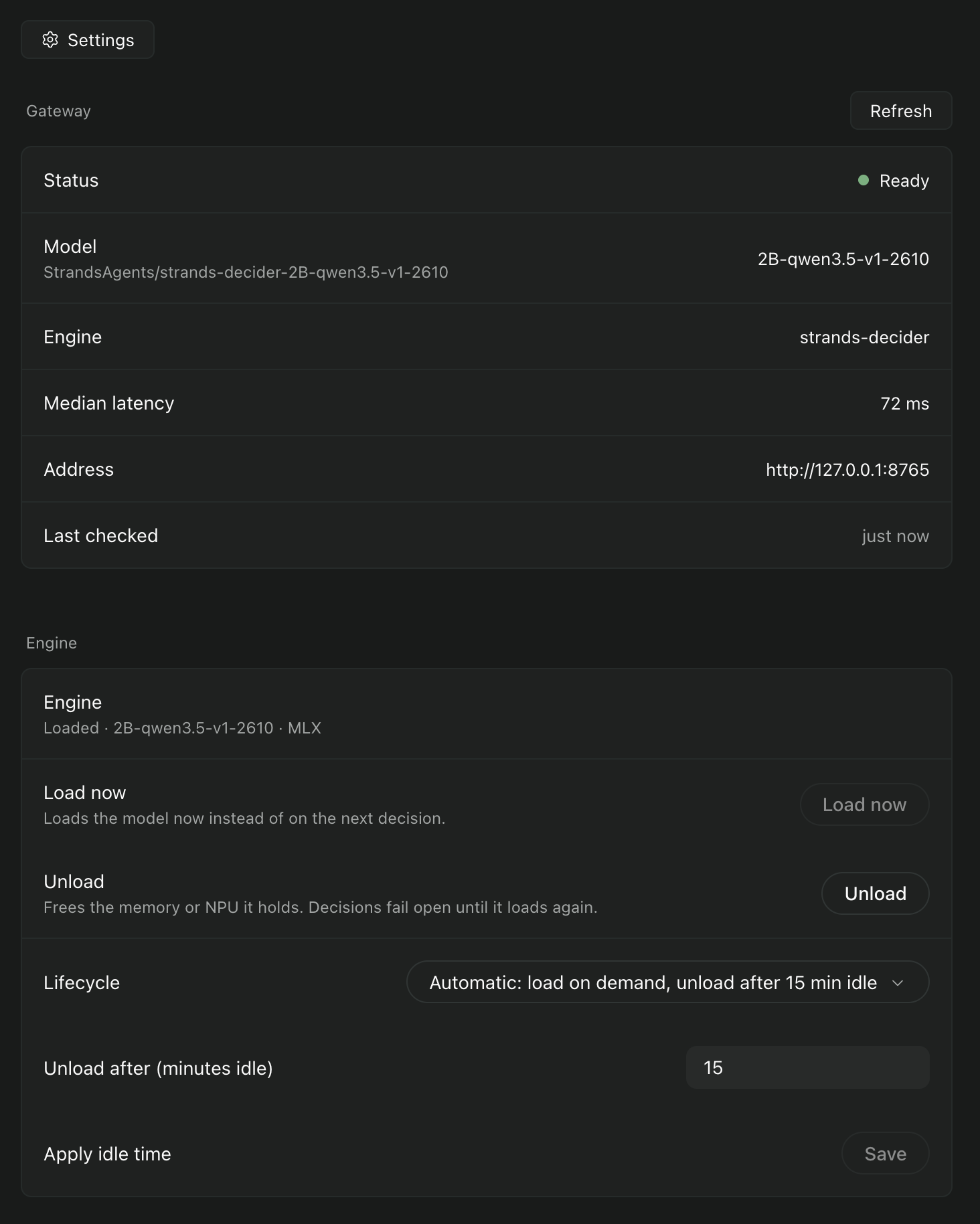
- Status: whether the gateway is up, and the engine's state: loaded (with model and engine), unloaded and loading on the next decision, loading, failed and why, or "Benchmarking (3 of 6)" while a benchmark runs. Load now and Unload act at once. Lifecycle picks automatic (load on demand, unload after 1 to 1440 idle minutes) or always loaded.
- Policies: the mode of each policy (
off,shadow,act). - Routing: which routing policy the gateway runs, a table mapping each of its presets to an agent profile or a model, with effort (thinking level) and mode, a reload for policy files, and "Write with an agent", which starts an agent that interviews you and writes a routing policy for your models.
- Engine and model has three blocks, top to bottom. Everything comes from the gateway, so a
gateway that knows another engine or model shows it here without a plugin update.
- Recommended for this machine: the model family you are using, on the runtime that is fastest here, in plain words (for example "d3 lite on NPU"), with its typical and long latency, why it was picked, and what is running now. It shows one state at a time: nothing to do, a download or install to finish, a backup engine after a failure, or a manual choice that is slower than the recommendation. Badges say when a measurement is out of date, comes from few runs, is noisy, or leaves other runtimes unmeasured. A single button acts on it: Use, Download, Show install steps, Use automatic or Run benchmark. Switching to a specific runtime while Automatic is on says "(turns off automatic)" and offers to turn it back on.
- Benchmark this machine: times every installed model on every runtime, one at a time, with short, typical and long prompts. See Benchmarks below.
- Advanced: engine, device and model (collapsed): the engine, device and model pickers with download size, memory and a latency hint, Download with progress, Use, the connection form for OpenAI-compatible servers, and the engine check (FastFlowLM) with a Re-validate button. A model too big for the machine is disabled. An engine this machine cannot run is hidden unless it is the active one, and an uninstalled engine says how to install it; the plugin never installs engines. An engine whose probabilities are not calibrated, such as OpenAI-compatible, shows an "uncalibrated" badge, and its models are discovered from the server. The connection form asks for the name of an environment variable on the gateway machine that holds the server's API key, never the key itself.
- Decisions in chat: show all rows, only notable ones (changed something, need attention, failed, or below 70% confidence in shadow), or none. Hiding rows does not stop decisions or the gateway's log. The details line and feedback buttons can be turned off separately.
- Sidebar: the status item at the top or bottom of the sidebar, or hidden; what its label shows; and whether pressing it opens a quick status popover or the status screen.
- Advanced: the gateway URL; an Agent tools switch (off by default); and a switch that loads the model when Paseo starts.
- Decision thresholds (collapsed): a slider and number field for each rule of each policy, such as "auto-allow when verdict is allow" at p(allow) ≥ 0.85, in steps of 0.01, with Reset. Below 0.90 it warns that more requests are auto-allowed without asking. An auto-allow rule never goes below 0.80; other rules stop at the gateway's floor.
- Paths (collapsed): the tools and directories the gateway uses, which depend on the gateway
host (
flmand the FastFlowLM model directory only appear where FastFlowLM is supported;strands-decider,uvand the Hugging Face cache everywhere), where each came from, and whether it works. You can set a custom absolute path, which the gateway checks first. A remote gateway shows them read-only.
Policy modes, thresholds, routing, engine, model, lifecycle and path changes are stored by the
gateway in its config.yaml, so they apply to every client of that gateway, including the
Claude Code and Codex hooks.
Agent tools
With Agent tools on, every interactive agent opened afterwards gets three native Paseo tools,
served by Paseo's own paseo MCP server. They work with the configured gateway, local or remote:
local_decider_policieslists the policies an agent may call, the input keys each reads and its questions.local_decider_decideasks a policy a fixed-choice question. The answer is advisory and never enforced.local_decider_explainexplains one decision by its id (loopback gateway with a control token only).
The tools run in the plugin process, so the gateway URL and its tokens never reach agent config;
requests use the same origin-bound credentials as the rest of the plugin. Calls are rate limited
per agent and overall, and the plugin's own policy-writer agent never gets them. The 2.x setting
that injected the gateway's decide MCP server into agent sessions is gone: if it was on, it
migrates to Agent tools.
Benchmarks
A benchmark runs inside the gateway, one model and runtime at a time, and keeps going if you close settings. It measures short, typical (1,024 tokens) and long (3,800 tokens) prompts.
- Decisions are passed to you while it runs. The gateway fails open, so agents are never blocked; the status views say "Benchmarking (k of n)".
- Your setup comes back when it ends. In automatic mode the gateway then re-ranks with the new results, so it may land on a faster runtime of the same model family. If it cannot switch back, the card says so and offers Try again and Use automatic.
- Cancel keeps what finished. Finish benchmark measures only what is missing.
- Results are from this machine only. Each is stamped with the engine version and hardware, and goes out of date when either changes; run the benchmark again then. Custom servers are not benchmarked.
How the recommendation is chosen
The recommendation compares runtimes of one model family and never changes the family. The family is the one you chose, else the gateway's default. Within it:
- Runtimes with a fresh measurement are ranked by typical latency; the fastest wins.
- Close calls (within about 10%) go to a dedicated runtime such as the NPU, then to the steadier one, then to the hardware order NPU, CUDA or ROCm, Vulkan, MLX, MPS, CPU.
- An out-of-date or few-run measurement counts as unmeasured: that runtime keeps its place in the hardware order until it is measured again.
- A runtime whose last run failed moves behind the ranked ones.
If a different family is clearly faster here, the card says so with a link to the results; it does not switch for you. In the results, Use fastest acts per family.
Status and statistics
- The status screen shows the gateway, the engine, and the service controls.
- The statistics screen shows, per policy, decisions, actions, latency, agreement with your answers, calibration, routing savings and the time you spent on prompts the policy would have allowed.
- The sidebar quick status popover has Refresh, Details and Settings buttons. Paseo 0.15.3 gives plugin screens no way to open other screens, so Details shows the settings inline.
Decision rows
Each decision shows as a row in the agent's chat. Tap a row (or its Explain button) to see why: the verdict and its probabilities, the rule that matched, the thresholds in force now (they may have changed since the decision), the precedent it leaned on, the variant and the plugin mode. Tap again to hide it.
- Routing adds a row to the new agent: the preset or model it moved to, or why it kept the creator's model or mode. Shadow routing draws one only for unsure or failed routes, or with Show decisions: all.
- Deciding… appears on a permission request when the decision takes more than a second, and is replaced by the decided row.
- Skipped appears on a permission request the decider did not take, with the reason: busy, rate limit, deadline spent or no answer. Answer it yourself. Skipped rows appear in act mode only.
- act · gateway shadow in the sidebar popover, and a warning in Settings, mean the plugin is in Act but the gateway runs that policy in another mode, so nothing is enforced. Choose Act again in Settings to set the gateway too.
Rows live in the daemon's memory, so they are gone after a daemon restart. A sidebar badge for rows needing attention is not built yet.
Feedback
Turn and /decide rows can ask "Right answer?" with one button per option. Your answer goes to
the gateway as ground truth for agreement, Brier score and calibration. Permission rows take your
Accept or Decline on the prompt as the outcome, and the row then reads "You allowed", "You
declined" or "You stopped the agent" (a Stop without Paseo's interrupt flag shows as a
decline). A decline is neutral; the row then offers Not a safety issue, Unsafe and Skip,
and only Unsafe is reported (as a veto). An auto-allowed row with a precedent key offers
Mark unsafe, which stops your past allows from lowering that subject's threshold; a
high-confidence rule may still allow it. Chips work for 24 hours and one tap, are unavailable
for rows drawn before a daemon restart, and follow "Ask for feedback". A row says "auto-allowed"
when the plugin allowed the request, otherwise "asked you", followed by what the model leaned
towards.
Commands
/decide <policy> <text>in an agent's composer runs a policy on your text and shows the result in the chat without changing anything.- Command Center items open the settings, the status screen and the statistics, and start, stop or restart the gateway service.
Where your data goes
The plugin sends agent content to the gateway at the configured URL:
- Turn outcome: the agent's task, recent chat (tool calls summarised) and its last message.
- Permission: the project path, recent chat, the agent's first and latest request, and the tool request with its input.
- Routing: the project path and the new agent's title.
- Usage: for agents that routing created, each turn's model id, token counts and cost, so the statistics can show routing savings. Reports stop for agents created before a daemon or plugin restart, so savings undercount.
/decide: the text you type after the command.- Agent tools (when on): for
local_decider_decide, the input the agent passes (capped in size), its agent ID and its workspace path; forlocal_decider_explain, the decision id. - Feedback: your answers to "Right answer?" chips and your accept or decline on prompts.
The gateway redacts secrets it recognises, then passes the input to its engine and writes it to
its decision log under ~/.local/share/local-decider/ on the gateway machine. With a built-in
engine (strands-decider, FastFlowLM, llama.cpp) or LM Studio on the same machine, nothing leaves
that machine. If you point the gateway at a remote URL, or the engine at an OpenAI-compatible
server on another host, this content goes there. Decision rows are stored in the agent's Paseo
timeline, so every client connected to the daemon can see them. Write with an agent starts a
normal Paseo agent, so the interview and your answers go to that agent's provider.
What this plugin runs
The plugin starts one kind of process: the gateway's user service manager, when you press Start, Stop or Restart. The command is fixed per platform, never built from settings or input, and shown next to each button:
- Linux, when
~/.config/systemd/user/local-decider.serviceexists:systemctl --user start|stop|restart local-decider.service. - macOS, when
~/Library/LaunchAgents/dev.local-decider.gateway.plistexists:launchctl bootstrap gui/<uid> <plist>,launchctl bootout gui/<uid>/dev.local-decider.gateway, andlaunchctl kickstart -k gui/<uid>/dev.local-decider.gateway. Ifbootstrapreports the agent is already loaded, Start runslaunchctl kickstart gui/<uid>/dev.local-decider.gateway; if the agent is not loaded, Restart runs thebootstrapcommand instead.
It runs without a shell and times out after 20 seconds. Stop asks for confirmation first. Without an installed service there are no buttons, only the command to install one.
What it downloads
Nothing, until you press a Download button. Each one names the model and its size, such as "Download (2.0 GB)", and asks the gateway to fetch that model's files into the engine's own cache on the gateway machine:
- strands-decider: the model and adapter repositories from Hugging Face
(
huggingface.co/StrandsAgents), with the engine'shf download. - FastFlowLM: the model with
flm pull, from FastFlowLM's model registry. - llama.cpp (Vulkan): a pinned d3 GGUF file from Hugging Face (
huggingface.co/ggml-org).
Not pressing it leaves nothing downloaded, and the gateway refuses to switch to a model that is not downloaded. The plugin never installs engines or other software: for a missing engine it shows the install guide link and the command to run yourself.