Dictation Polish
Wispr Flow-style dictation polishing inside Paseo: remove fillers, fix self-corrections, and format spoken drafts with one click.


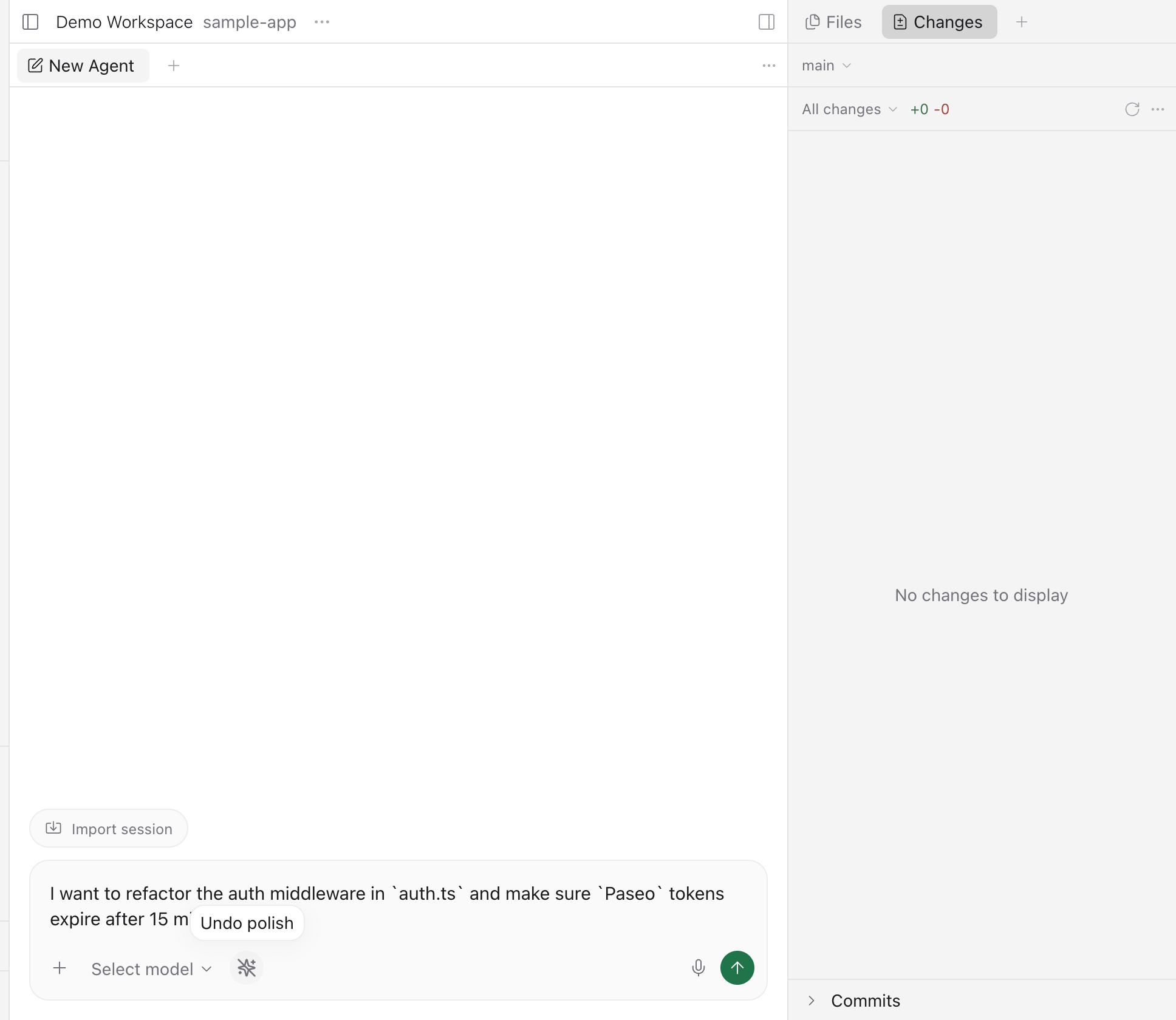

Dictation Polish cleans up spoken dictation and rough prompt drafts inside the Paseo composer before you send them to an agent.
How it works
After dictating or typing a Raw Draft in edit-before-send mode, click Polish in the composer action bar (or enable the optional Composer Pill for one-tap access above the composer). The plugin sends the Raw Draft to your configured text-only OpenAI-Compatible API Polish Engine, replaces the composer text in place with the Polished Text, and switches the button to Undo polish (a slashed Sparkles icon) so you can restore the exact Raw Draft with one click.
You can also revert from the Command Center using Revert last polish while the polished text is still unchanged, or open plugin settings with Dictation Polish Settings. If you edit the composer while a polish request is running or after polishing finishes, your edits take precedence and the plugin will not overwrite them. On any timeout, network failure, or empty output, the plugin fails open and keeps the Raw Draft untouched.
The Polish Engine runs strictly as a direct text-only /chat/completions request (temperature: 0) without spawning a Paseo agent session or exposing any filesystem, shell, or MCP tools.
Setup
Requires Paseo >=0.17.0.
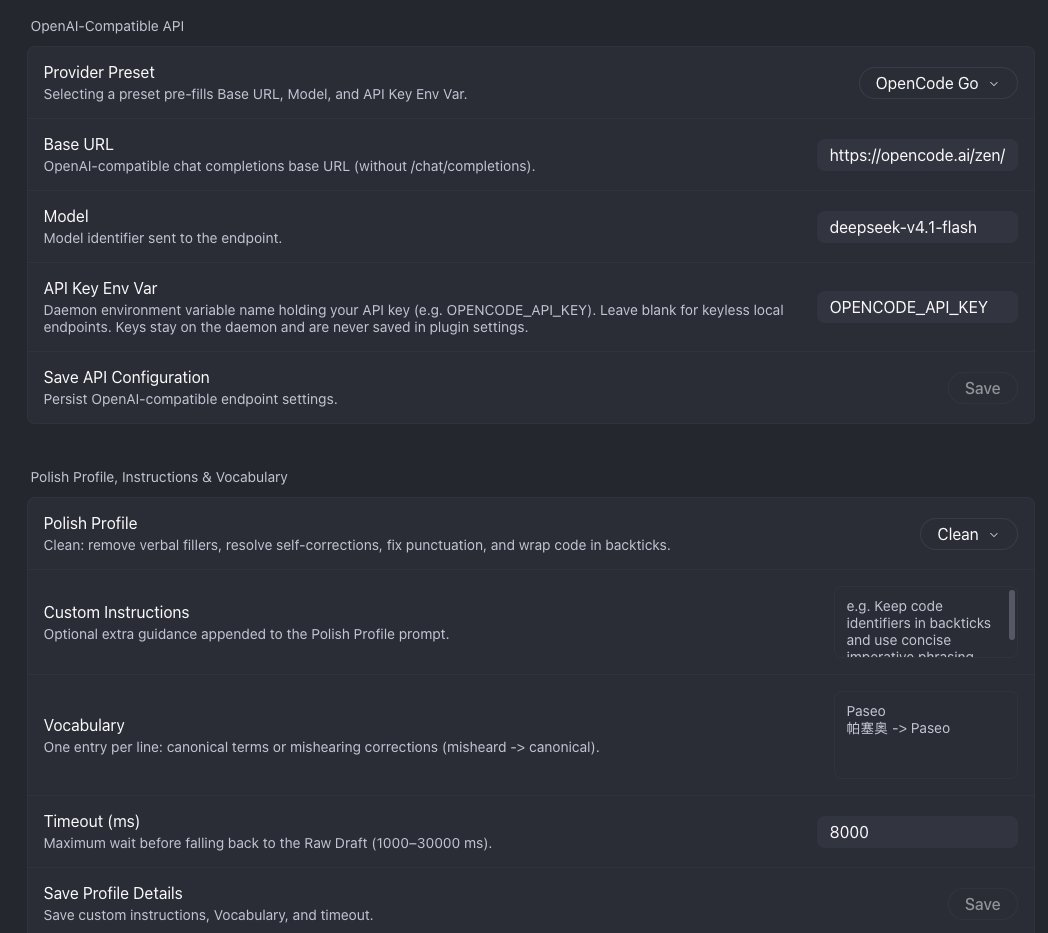
Open Settings > Plugins > Dictation Polish on your Paseo host and configure your OpenAI-Compatible API endpoint:
- Pick a preset (
OpenCode Go,OpenAI,Groq,Ollama (Local), orCustom) to pre-fill the Base URL, model, and API key environment variable name. - For example,
OpenCode Godefaults tohttps://opencode.ai/zen/go/v1, modeldeepseek-v4.1-flash, andOPENCODE_API_KEYon the Paseo daemon host. - For keyless local endpoints such as Ollama, leave the environment variable name blank. API keys are resolved strictly from the daemon environment and are never stored in plugin settings or returned to connected clients.
- Optionally enable Show Composer Pill if you want a one-tap pill above the composer for active agents (useful on iOS/mobile).
Use the Inline Test Playground at the bottom of the settings screen to test your configuration and measure round-trip latency before using it in a workspace.
Capabilities, data handling, and limits
Polish Profiles and formatting options
- Polish Profile:
clean: Removes verbal fillers, stutters, and mid-sentence self-corrections, fixes punctuation, and wraps code identifiers, file paths, and CLI commands in backticks while keeping the original language and intent.structured: Appliescleanrules and organizes multi-point spoken instructions into concise Markdown bullet lists or numbered steps.translate-en: Appliescleanrules and translates Chinese or mixed Chinese/English Raw Drafts into concise English prompts while keeping technical identifiers intact.
- Custom Instructions: Optional formatting preferences appended to the Polish Profile prompt.
- Vocabulary: Host-wide list of preferred spellings and mishearing corrections, one entry per line (
misheard -> canonicalorcanonical), injected into the polishing instructions. - Timeout (ms): Maximum wait between
1000and30000ms (default8000) before falling back to the Raw Draft.
Data sent and stored
- Only the current composer Raw Draft (or playground sample text), along with your selected Polish Profile, Custom Instructions, and Vocabulary, is sent to the OpenAI-Compatible API endpoint you configure.
- Settings are stored in host-scoped plugin preferences on the Paseo daemon. API keys are never stored in plugin settings JSON; the daemon resolves Bearer tokens strictly from the configured host environment variable.
- Undo snapshots are kept only in client memory for the current session and cleared when the draft changes.
Known limits
- Works only through the manual Polish action (or optional Composer Pill) in edit-before-send mode.
- Does not intercept direct-send dictation or modify Paseo Voice Mode, as Paseo does not currently expose a dictation post-processing hook.
- Background Agent mode is disabled so spoken drafts are never sent to an agent session with built-in or Paseo MCP tools.