
Sidebar organizer
Labels and pins workspaces with role, status and reply labels so the sidebar shows what needs you.

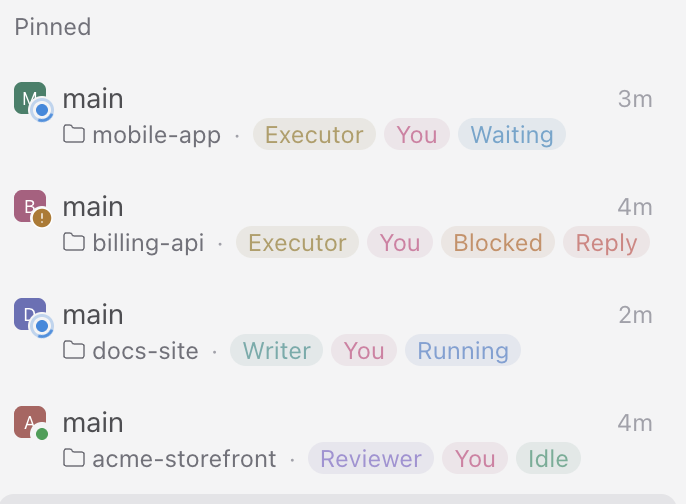
Sidebar organizer labels and pins workspaces so the sidebar shows which conversations involve you, what each agent is doing, and which ones wait for your answer.
Each workspace gets up to four kinds of labels, always in this order:
- Role labels, from rules you define. When a workspace's first agent starts, the first rule whose text appears in the agent title adds its label. With no rules, nothing is added.
- The attention label (default You), for workspaces a person opened rather than another agent. These are also pinned to the top of the sidebar. The label can be hidden, so the pin alone marks them and every pinned workspace counts as one. After a set number of days without activity (default 3) the plugin unpins them and removes the label, unless the agent is running or waits for your reply.
- A status label that follows the agent that opened the workspace: Running while it works, Waiting when it stopped while one of its child agents still works, Idle when nothing runs, and Blocked when it waits for a permission or a turn failed. Each status can be tracked without showing a label, for example Running, which Paseo already shows with its own icon.
- The reply label (default Reply), last. The plugin adds it when the agent asks you a question through the provider's question tool. An agent or script can add it when its answer needs yours. A setting, off by default, also adds it after every answer to a message of yours in a workspace that involves you. The plugin removes it when you send a message or answer the question. Schedule and heartbeat runs leave it in place. Messages sent by another agent or script through
paseo sendcount as yours.
The plugin leaves labels you add by hand in front of its own and never removes them. When it starts, and every 30 minutes, it brings every active workspace up to date.
Settings → Plugins → Sidebar organizer sets every label name and color, whether to pin, which statuses show a label, whether every answer to you adds the reply label, the inactivity period, and the role rules (text to match, label name, color).
Workspaces created from the app are pinned as they are created. Workspaces created with paseo run --new-workspace show unpinned for a moment before they move up.
Requires Paseo 0.11.2 or later on a daemon that listens on a local TCP address. The plugin SDK has no label or pin calls yet, so the plugin connects to that daemon the way the Paseo CLI does, using the daemon's local credential. It sends nothing outside the daemon.