
Top
A Paseo plugin that shows host CPU, memory and disk usage in the sidebar footer.

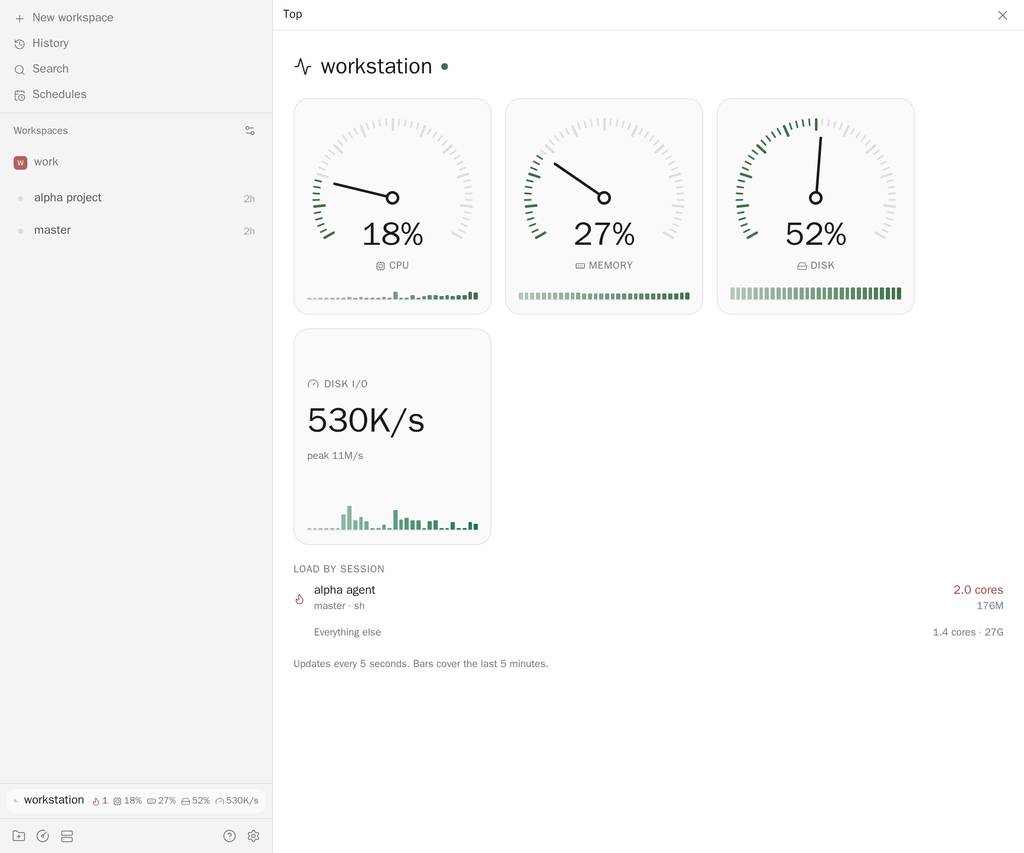
Top shows how busy a host is without leaving your work, and which agent is responsible. It adds a row to the sidebar footer with the host name and its CPU, memory, disk and disk I/O, and a Top screen with dials, a five minute history strip for each reading, and a list of load by agent session.
Usage always describes one host. With several hosts connected, the footer follows the host you are working in, and the Top screen has Paseo's host picker. Each daemon measures itself; nothing is sent between hosts.
Load by session adds up the CPU and memory of everything an agent started, not only the agent process. A build, test run or dev server launched by a tool counts toward the agent that launched it. Each row shows the agent and workspace names you gave them, the busiest command in its tree, cores and memory in use, and opens the agent when pressed. A session is flagged with a flame, and counted in the footer, when it holds one busy core for 30 seconds or a quarter of the host's memory. Everything not listed is shown on one "Everything else" line.
How processes are matched to agents: Paseo gives every agent session an identifier in its environment, and everything the session starts inherits it. On every scan Top reads each process's environment into memory, keeps only that identifier and drops the rest at once; nothing else from it is stored, logged or sent anywhere. A process whose environment cannot be read, such as one owned by another user, cannot be tagged. A process with no identifier is charged to the nearest ancestor that has one, since tools often clear it. Only agents that belong to the host you are viewing are listed; processes of agents that belong to other daemons on the same machine are counted under "Everything else", together with untagged processes and sessions beyond the first ten. Per-session load works on Linux, macOS and Windows. The scan covers every process the host lists, so other users' processes are counted too, under "Everything else". Containers, virtual machines and WSL run outside the agent's process tree and show as unattributed. On macOS and Windows the environment of another user's processes cannot be read, so they are never matched to an agent. Memory is the resident size on macOS and the working set on Windows, which includes pages shared with other processes (every DLL counts in every process), so a Windows session with many processes reads higher than what it really uses. If the process list cannot be read, the list says it is not available instead of showing an empty one, and the scan is retried more and more slowly.
What the numbers are and are not: load is sampled every ten seconds, so a process that starts and exits between two scans is never seen, and one that is still running is charged for the CPU it used since it started. A session is flagged only when it has held a full core across three scans in a row, so a single burst does not flag it. Memory is each process's resident memory added up, so memory shared between processes of one agent is counted more than once, and the quarter-of-memory rule compares against the machine's memory, not a container's limit. Sessions plus "Everything else" cover the processes that were scanned, not the whole host: kernel time, finished processes and the page cache are outside them.
CPU is the share of non-idle time over the last couple of seconds. Memory excludes reclaimable cache on Linux. Disk is the filesystem that holds the daemon user's home directory. Disk I/O is bytes read plus written per second across the physical disks, on Linux. History is kept by the daemon in memory, so it survives a page refresh and is shared by every client, but starts over when the plugin or daemon restarts. A reading the host cannot give shows --; if the plugin cannot be reached, the footer says unavailable.
The plugin only reads usage counters and process tables. It has no settings. On Linux it reads /proc. On macOS it runs ps twice every ten seconds, and on Windows it runs one PowerShell command, to list processes and read the Paseo identifier from each one's environment; it changes nothing and runs nothing else. On Windows that command declares native functions and reads other processes' memory, which endpoint-security tools on managed machines may flag. Set PASEO_TOP_SESSIONS=off in the daemon's environment to list no processes on any platform; the rest of Top is unaffected.
Requires Paseo ^0.12.0.