
Playbooks
Automate multi-agent workflows with YAML playbooks: a manager agent orchestrates a pipeline of subagent steps, in parallel or in loops, up to human approval gates.
$ paseo plugin add lerenn/playbooks


Playbooks turns a multi-agent workflow into a YAML file in your repository. A manager agent runs it step by step, each step as a subagent, and stops at human gates for your decision.
Example
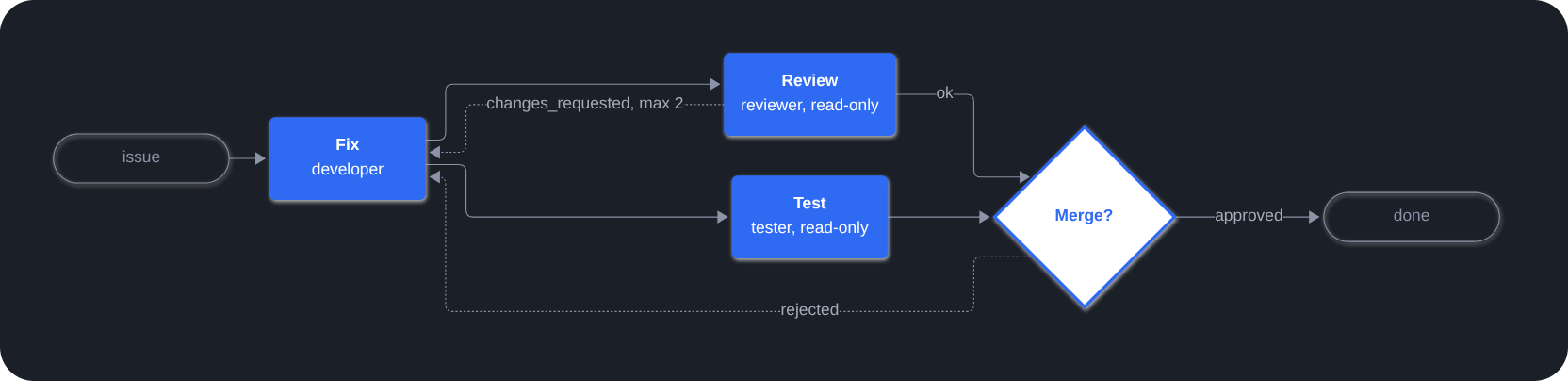
.paseo/plugins/playbooks/fix.yaml: fix, then review and test in parallel, loop back on
requested changes, and ask a human before finishing. Roles are defined once in roles/<id>/.
title: Fix a bug
inputs:
  issue: { type: string, required: true }

steps:
  - id: fix
    role: { name: developer, prompt: "Fix {{ inputs.issue }} and add a test." }
    inputs: [issue]

  - id: review                                         # review and test run in parallel:
    role: { name: reviewer, prompt: Review the fix. }  # their roles are read-only
    needs: [fix]
    outcomes: [ok, changes_requested]
    on:
      changes_requested: { goto: fix, max_loops: 2 }

  - id: test
    role: { name: tester, prompt: Run the test suite. }
    needs: [fix]

  - id: approve               # human gate: Approve or Reject
    needs: [review, test]
    gate: { question: Merge this fix? }
    on:
      rejected: { goto: fix }
Features
- Workflows as code: playbooks, shared roles and agent defaults live in
.paseo/plugins/playbooks/. See the format reference. - Parallel steps and loops: steps form a graph through
needs, and loops go back withgotoand a limit. After-tasks, such as a retro, run once the run ends. - Script steps: deterministic work, such as waiting for a PR to merge or a deploy to
finish, runs as a script from the playbook's
scripts/folder, with no agent. - Human gates: approve, reject or pick a choice from the panel or in chat.
- Rules enforced by the plugin: it validates playbooks, refuses transitions a playbook does not allow, checks read-only roles with git, and keeps run state across daemon restarts. See how it works.
- Provider fallback: a tier in
defaults/main.yamlmay list several providers. When a step agent runs out of tokens, the same attempt restarts on the next one, and the exhausted provider is tried again afterproviders: { exhausted_for }(1h by default). - Live graph: the Playbooks panel in the workspace sidebar shows each run as it goes. From it you can start, pause, resume or cancel a run, or restart it from a step.
- Every run on one screen: a Playbooks entry in Paseo's left sidebar, badged with the gates waiting for you, lists the runs of all workspaces by playbook, each with its progress across the steps. Decide a gate from there without opening the workspace.
- A Sidekick per project: a chat column on the Playbooks screen, one tab per project, with a
coordinator agent defined by a
sidekick/folder beside the playbooks. It watches the runs, judges which decisions could be automated, and sends subagents to change the playbooks in pull requests you merge. Its prompt forbids it to edit files or run commands itself.
Get started
- Getting started: write, validate and run a first playbook.
- Examples: a pull-request workflow, a release with QA, a capability combining both through a gate, and a docs check.
- Agent skill: teaches your agents to write playbooks.
Good to know
- Pre-1.0: any minor release may change the playbook format in breaking ways. Pin a release tag and read the release notes before upgrading.
- Steps may run in any agent mode,
bypassPermissionsincluded. Only start playbooks from repositories you trust. - Every agent except step and gate agents can list, cancel, restart or take over runs, and start manual after-tasks, from any chat. See the tools.
- Requires Paseo 0.14 or later. Run state is kept in
$PASEO_HOME/plugin-data/lerenn/paseo-playbooks/runs/. Archiving a run hides it and keeps its state, andrestart_runcan reopen it. The run's worktree is removed when the run ends (a failed run's is kept for 24 hours, unless the volume is high), which does not delete its state. Server code runsgitin workspace folders, and runs script steps (executables from the playbook'sscripts/folder) in the run's worktree.