Clear Chat
v0.17.2.1 · Answer an agent's lettered questions with a card: pick an option or write your own, preview, and send.

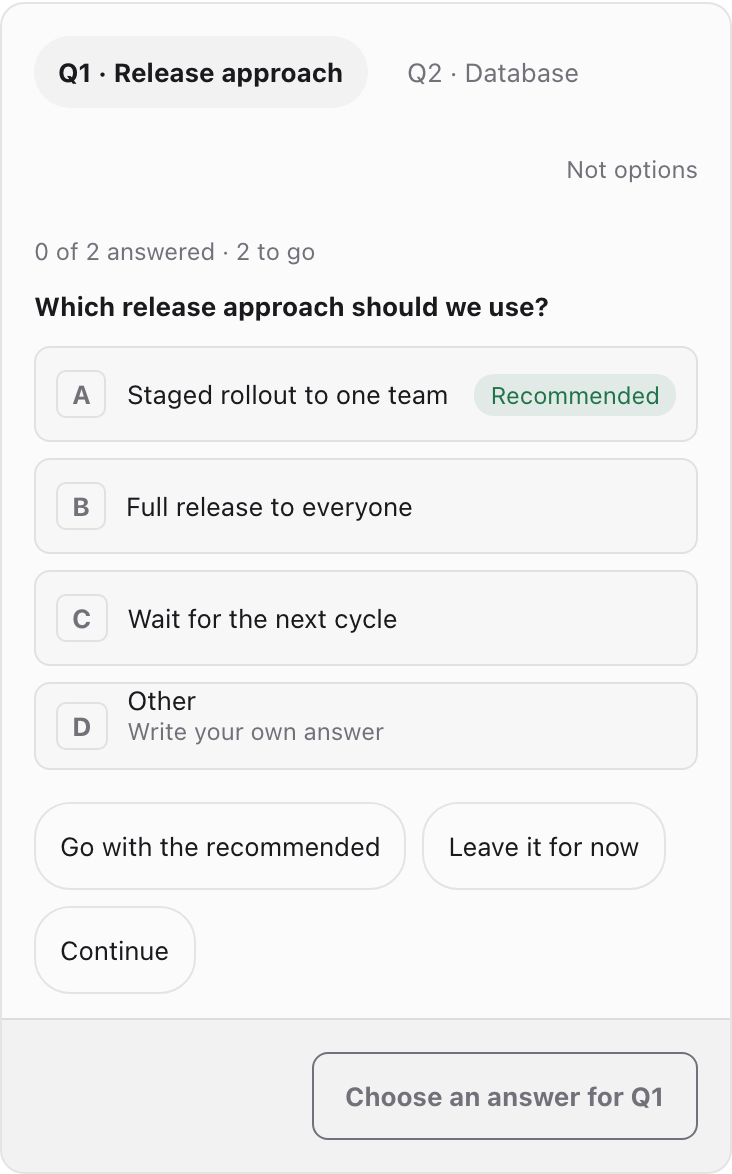

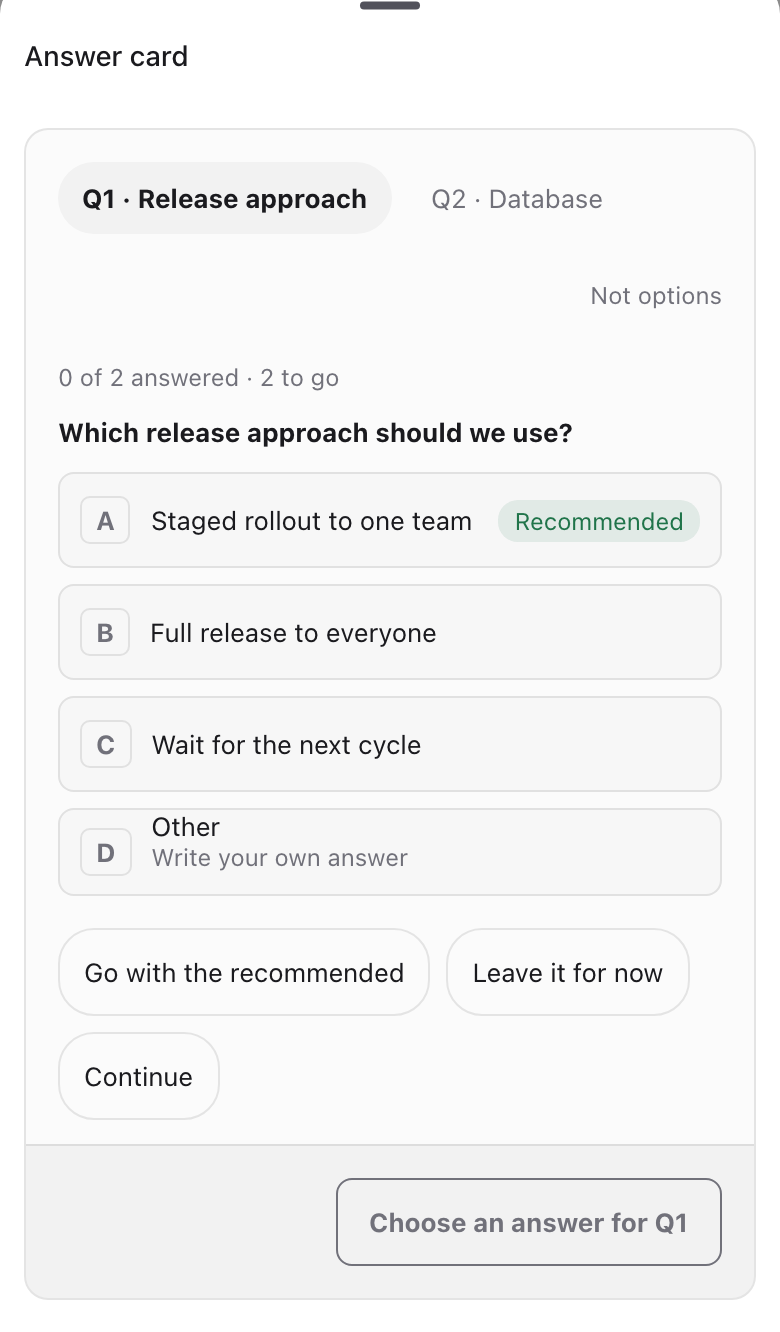
Clear Chat is a Paseo plugin for the answer card. When a reply asks lettered questions, the card lets you pick an option or write your own, preview the answer, and send it. It does not draw the conversation. For the conversation view, use the separate plugin Better Paseo.
The interface text follows the app language: English, Simplified Chinese, or Japanese. The plugin list shows the English description.
What's new in 0.17.2.1
- This release follows Paseo 0.17.2: the first three parts of the version are the Paseo version this build was checked with. The answer card code is the same as the previous release, so nothing changes in how the card works.
- The install now uses only the committed lockfile: it runs
npm ci --include=dev --ignore-scripts, so it installs nothing outside the lockfile and runs no install script that a package declares. A missing required dependency fails the installation with a setup message instead of starting a card that cannot work. - The previous release kept Send in view when the answer card opens in the desktop panel: the question area scrolls inside the card, the saved replies scroll with it, and the progress line and Send stay in one row at the bottom. A short fade shows when more content follows, and a long written answer previews in at most two lines there.
- The dependency pins are unchanged: the install still uses patched versions of six transitive packages, and CI fails when a production dependency has an advisory.
What it does
- Recognises numbered questions with at least two lettered options, plus a recommendation mark or a short-reply hint. A line of its own that names one option, such as
Recommended: A, also marks that option. Code fences and quotations are ignored. - The card's controls choose an option, write Other, preview a message such as
1B 2A, and send it. After sending, the card is no longer shown; the message in the chat, such as1B 2A, is your answer. - Not options dismisses a false detection and remembers it.
- Saved replies are edited on the settings page. On the card they insert a phrase and do not send.
- A bare letter inside a sentence is not treated as an answer. A numbered token such as
1Astill counts.
After a reply that asks lettered questions has finished, a button above the message box opens the card. It shows the progress, for example Answer 0/2; a desktop tooltip and a narrow screen's panel title carry the full name, for example Answer card · 0/2 answered. It opens the whole card in a panel, which is a sheet on a narrow screen. In the desktop panel the question area scrolls inside the card, and the progress line and Send stay in one row at the bottom, so Send is visible without scrolling the panel. Choosing answers updates the count, closing and reopening the panel keeps them, and the button is gone after Send until the next such reply finishes. The button belongs to the conversation on screen.
The settings page can be opened.
Setup
Clear Chat 0.17.2.1 needs Paseo 0.16.0 or later. On Paseo 0.15.x this version cannot run normally; stay on Clear Chat 0.15.4.x. This build was checked in the browser interface of Paseo 0.17.2 (the web UI the paseo command starts) with a test agent that needs no model, using a two-question card at 1280×900 and 390×844, and the version line on the settings page was checked. Its answer card code is the same as the previous release, which was checked in Paseo 0.17.1 at 1280×900, 1280×440, and 390×844, including once in the dark theme. It was not checked in the desktop app, with a real model, or on physical iOS or Android devices.
Installation runs npm ci --include=dev --ignore-scripts on the daemon host, so Node.js and npm must be available there and the host must be able to reach the npm registry.
paseo plugin install git:jasonhnd/paseo-clear-chat --ref v0.17.2.1
paseo plugin update clear-chat --ref v0.17.2.1 --yes
If you used Beautiful Chat, its settings file is copied on first start when Clear Chat has none yet. Read the upgrade steps in the repository README before removing Beautiful Chat, because removing a plugin also removes its settings. Copied keys for features this version no longer shows stay in the file and have no control.
Settings
Open Settings → Plugins → Clear Chat. The page heading is Clear Chat; the first settings card is titled Answer card.
- Show an answer card under replies that ask lettered questions is on when no value is stored. A stored value still wins.
- Saved replies is one phrase per line. The default phrases are
Go with the recommended,Leave it for now, andContinue. - The installed version is shown in the Answer card card. A directory install can show an older version from that directory.
- Report a problem opens a GitHub issue form in the browser. Nothing is sent unless you submit it.
Settings are saved on the host and shared by every client connected to it.
Data and permissions
- Clear Chat does not send conversation content off the host, except the message you send yourself. Send on the answer card sends one message, written as you, through Paseo to the agent of the current chat.
- This version does not read local image files, highlight code, or register a provider copy.
- Startup does not delete anything under the plugin data directory. Older image and history directories are left in place and are not used.
- The only network use by Clear Chat itself is
npm ciat install time. - Report a problem opens a GitHub issue form. Nothing is sent unless you submit it.
Limitations
- Clear Chat does not draw the conversation. Use Better Paseo for that view.
Plan 2Bcan still be read as an answer.- In the desktop panel a long written answer previews in at most two lines: the whole answer index, then the start of the first written answer. The message that is sent keeps the full answer, and the narrow panel shows the full preview.
- A window shorter than about 117 px is not supported: the panel's footer no longer fits.
- While a reply is still being written, its button does not appear. If the card is open when the agent starts answering again, the panel says the reply is still running, and answers cannot be given until it ends.
- This build was checked in the browser interface of Paseo 0.17.2 (the web UI the
paseocommand starts) with a test agent that needs no model, using a two-question card at 1280×900 and 390×844, and the version line on the settings page was checked. Its answer card code is the same as the previous release, which was checked in Paseo 0.17.1 at 1280×900, 1280×440, and 390×844, including once in the dark theme. It was not checked in the desktop app, with a real model, or on physical iOS or Android devices. - Removing the plugin deletes its settings. Back them up first.
The repository README has the install commands, the answer-card steps, and troubleshooting.