

Sayr in Paseo
Project management right from your coding agent. View, comment, and manage your Sayr tasks, or click a button and pass it off to an agent. Define a default prompt when passing it along, or customize it when passing off.
Screenshots
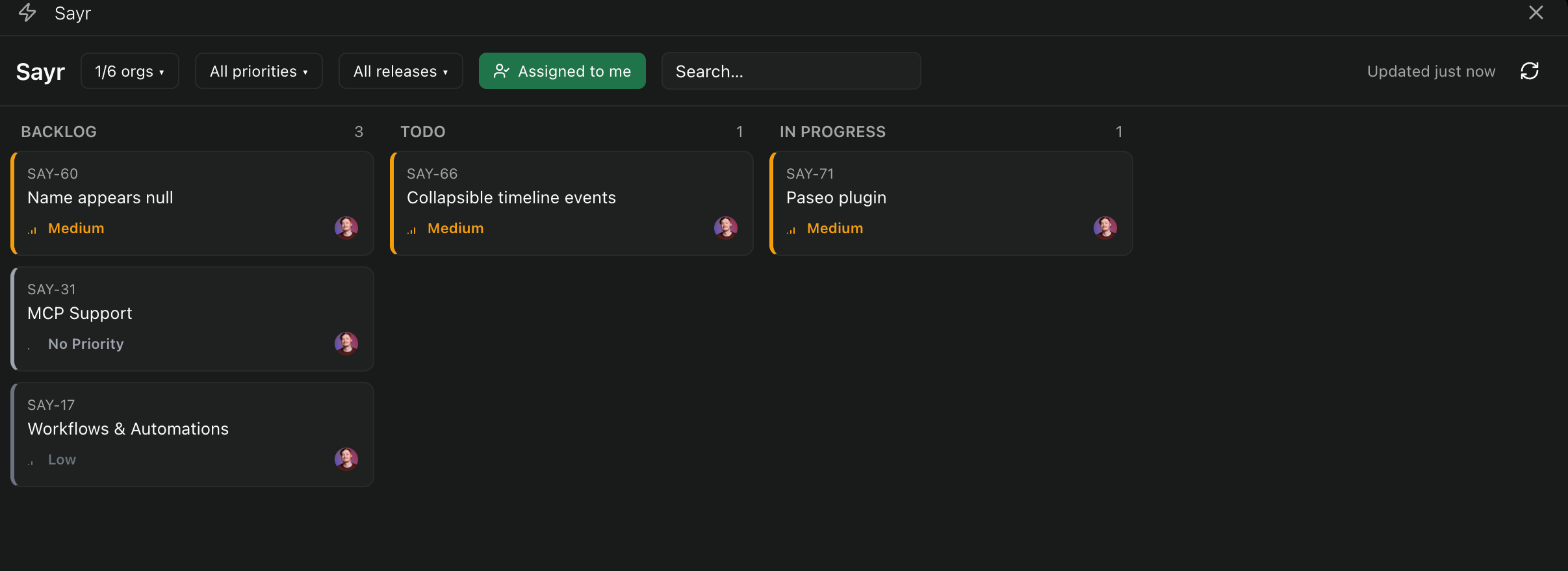
<table> <tr> <td width="33%" valign="top">Board — multi-org, status columns, filters
<img src="https://raw.githubusercontent.com/dorasto/sayr/main/packages/paseo-plugin/assets/sayr-plguin-1.png" alt="Sayr plugin board view"> </td> <td width="33%" valign="top">Task detail — inline editing, rich rendering, AI summary
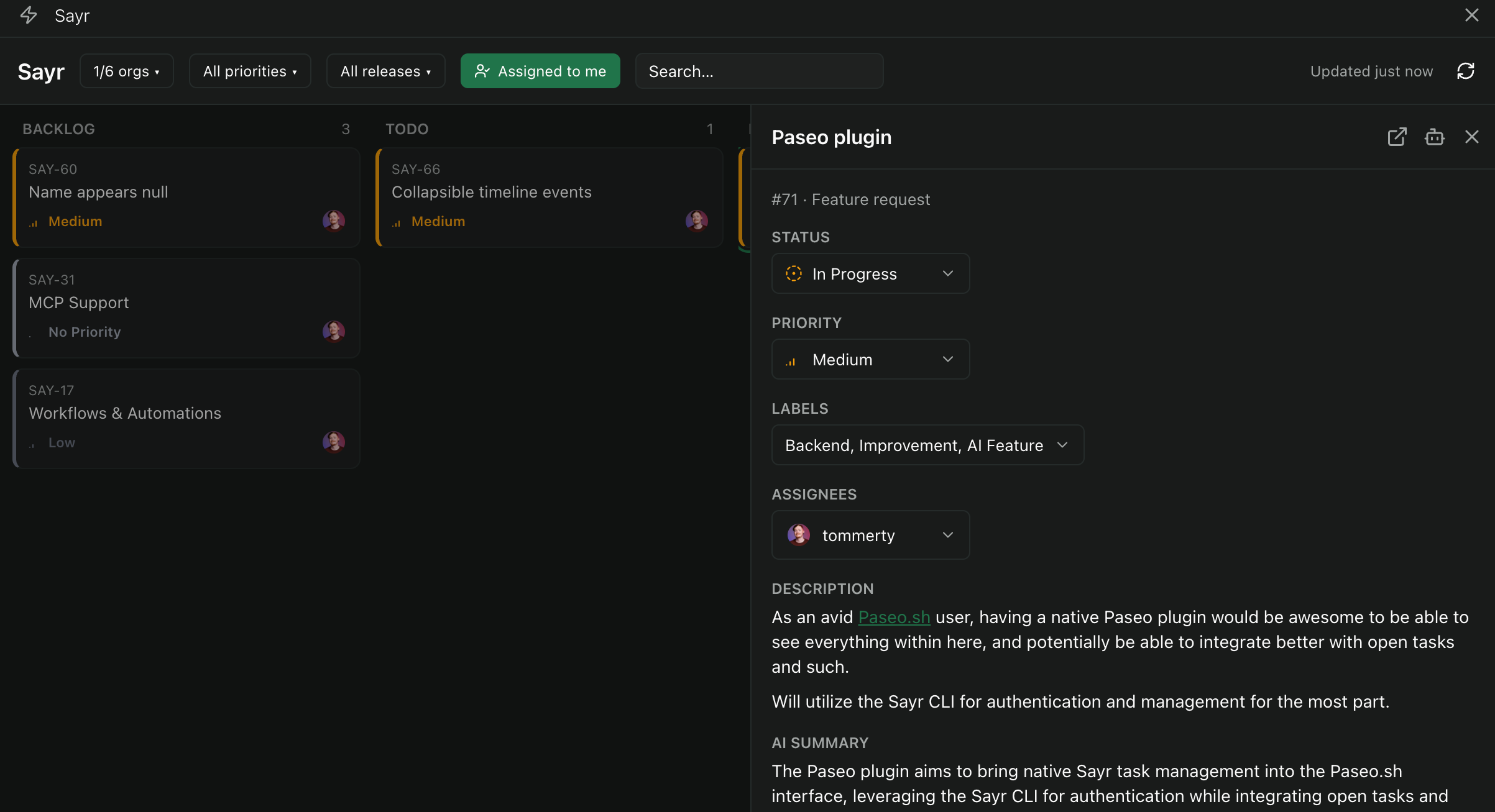
<img src="https://raw.githubusercontent.com/dorasto/sayr/main/packages/paseo-plugin/assets/paseo-plugin-2.png" alt="Sayr plugin task detail sheet"> </td> <td width="33%" valign="top">For reference — the real Sayr web app the plugin's board mirrors
<img src="https://raw.githubusercontent.com/dorasto/sayr/main/packages/paseo-plugin/assets/sayr.png" alt="Sayr web app board view"> </td> </tr> </table>Requires
- An account on Sayr.io or,
- A self hosted instance of Sayr
- Valid API key (can be created here)
- Sayr CLI
Install
paseo plugin install npm:@sayrio/paseo-plugin
To install a specific release, add a version to the spec (npm:@sayrio/paseo-plugin@0.2.0). Pick up
newer releases later with paseo plugin update sayr.
To track the latest source on main instead of published npm releases, install from git:
paseo plugin add dorasto/sayr --ref main --path packages/paseo-plugin
Either way the plugin installs under the ID sayr. Then work through Requirements
below — the plugin is a thin shell over the sayr CLI, so it can't do anything until that's
installed and logged in on the daemon machine.
How it works
The plugin doesn't call the Sayr API directly. Every RPC handler shells out to an installed sayr
CLI binary (@sayrio/cli, see packages/cli/README.md) on the daemon machine and
parses its --json output. That means:
- Auth is whatever
sayr loginalready has stored in~/.sayr/config.jsonon the daemon — the plugin never sees or stores a token itself. - Every write action (status, priority, assignees, comments) round-trips through the same CLI commands you could run by hand, so plugin and CLI can never drift in what they're capable of.
Requirements
- Paseo
>=0.8.0. - The
sayrCLI installed and logged in on the daemon machine (not just wherever the Paseo app itself is running):npm install -g @sayrio/cli sayr login --token api_xxxxxxxx
Settings
Settings → Plugins → Sayr lets you point the plugin at a different installed binary — e.g.
sayr-local to work against a local dev backend instead of production (see the CLI README's
SAYR_PROFILE section). Stored server-side at $PASEO_HOME/plugins/sayr/settings.json, defaulting
to sayr.
Features
- Board — every organization the CLI's logged-in user belongs to, fetched in parallel, with backlog/todo/in-progress columns (done/canceled tasks aren't fetched at all — the board isn't a full archive). Search, and per-org/per-priority filter chips.
- Task detail — opens as a resizable side sheet, not a modal, mirroring the real product's panel behavior rather than replacing the whole screen. Status, priority, and assignees are all editable inline; assignee/category names and colors resolve the same way the web app's own pickers do.
- Rich comment/description rendering — task descriptions and comment bodies are ProseKit
documents, not markdown strings.
client/prosekit-view.tsxrenders the real node/mark tree (headings, bold/italic/strike/underline/code, lists, blockquotes, code blocks) as actual styled React Native elements, plus@user/#task/!categorymention pills — not a flattened, unformatted dump of the text. See that file's header comment for exactly what is and isn't covered (no live task-title lookup in task mentions, no avatar image inside a mention pill, no table grids, no code block syntax highlighting). - Send to agent — hands a task's title, status, priority, description, and recent comments off
to a new Paseo agent as a seed prompt (
client/agent-prompt.ts), via a real workspace + agent creation call, not just a copy-paste.
Architecture
Standard Paseo plugin layout — client/ (React Native, no Node/DOM APIs except the one
platform-gated client/web.ts), server/ (the daemon subprocess, shells out to the CLI, can use
Node freely), shared/ (Zod RPC contracts and plain types, importable from both). Every write and
every non-trivial read goes through a defineRpc contract in shared/task.ts/shared/settings.ts,
handled in server/task-handlers.ts/server/settings-handlers.ts, called from client/ via
useRpc(). See AGENTS.md's row for this package and the individual file header comments for the
reasoning behind specific choices (why the sheet isn't a host Modal, why colors are priority-based
rather than per-org, why shared/ has small local copies of a couple of @repo/util helpers instead
of importing them, etc.).
Development
cd packages/paseo-plugin
pnpm typecheck        # tsc --noEmit
pnpm lint             # biome check .
pnpm lint:fix         # biome check . --write
No build step — Paseo loads plugin source directly. The loop after editing anything under
client/, server/, or shared/:
paseo plugin reload sayr
paseo plugin logs sayr   # confirm "Plugin ready" with no error
Only run pnpm install at the repo root if you add a new dependency to package.json. Every RN
client file should stay free of DOM/Node APIs (rg -n "document\.|window\.|className=|onClick=" client/
should only ever match client/web.ts), and no async arrow functions in client code (a Hermes
bug) — worth a quick grep before reloading if you touched anything under client/.
Known gaps
- Labels can be created but not edited or deleted.
GET/POST /me/labelsand the labels picker cover listing, selecting, and creating a label (with a public/private toggle), but there's no way to rename, recolor, or delete an existing one from the plugin — that still needs the web app. - Board doesn't show done/canceled tasks. The status picker still covers the full status enum, so a task can be moved there — it just drops off the board once it is.
Shoutouts
Inspiration of the layout & UI comes from gpambrozio's github-board plugin. Great resource for learning how to build Paseo plugins. <3