
Schedule Submit
Schedule user messages to agents in Paseo with a composer pill button, an intuitive popover UI, and a /schedule slash command
$ paseo plugin add cybershape/schedule-submit

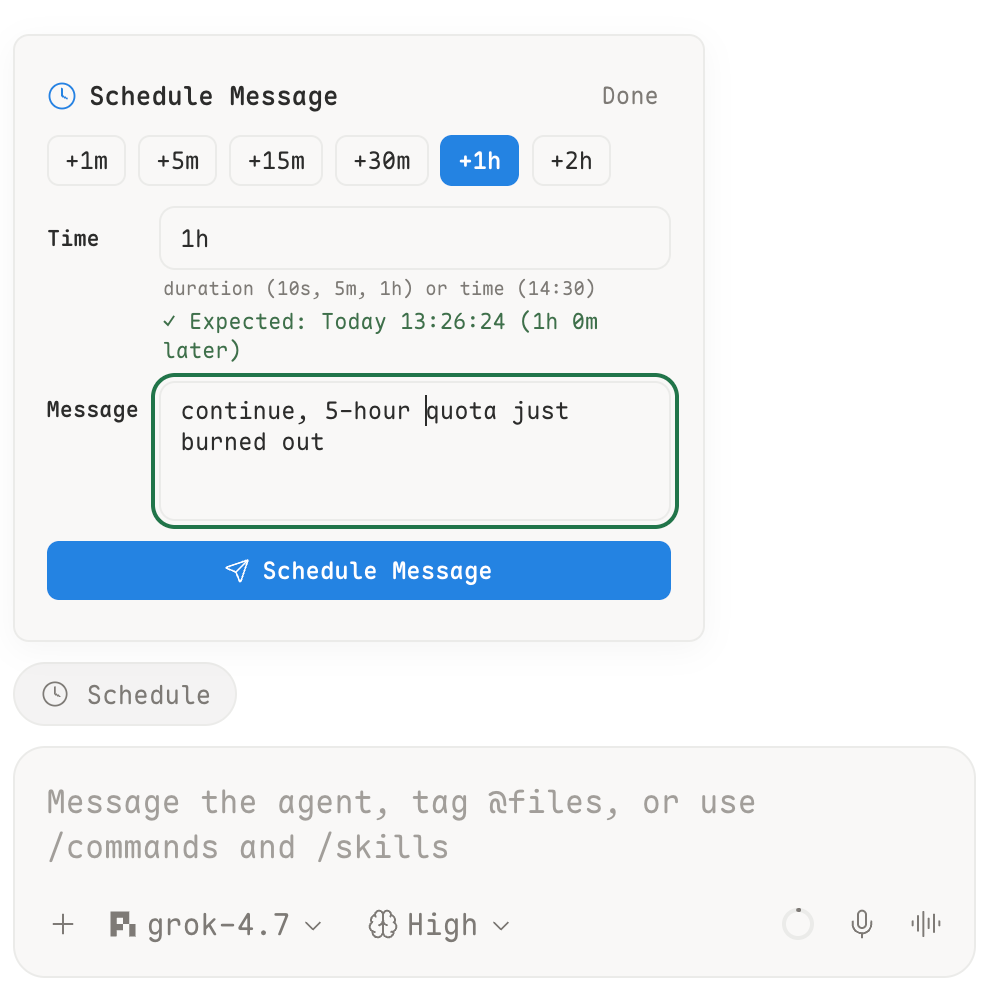
Schedule user messages to agents in Paseo with a composer pill button, an intuitive popover UI, and a slash command.
How it works
When you schedule a message, the timer runs in the background inside the Paseo daemon process. Closing the popover, switching workspaces, or navigating away will not interrupt scheduled jobs. When the scheduled time arrives, the message is dispatched to the target agent as a user prompt and automatically triggers agent execution.
Features
- Composer Pill: A dedicated Clock button located directly above the agent composer input box.
- Quick Presets: Fast-delay shortcuts including
+1m,+5m,+15m,+30m,+1h, and+2h. - Flexible Time Parsing: Supports relative durations (such as
10s,5m,2h) and specific clock times (such as14:30or18:00, rolling over to tomorrow if today's time has already passed). - Live Preview: Dynamically computes and displays the expected trigger date and time as you type.
- Task Management: Lists pending scheduled jobs for the current agent with one-click cancellation.
- Workspace Label: Automatically attaches a blue
schedulelabel to workspaces containing active scheduled tasks, and clears it when active tasks reach zero. - Slash Command: Directly schedule from the chat box with
/schedule in 5m <message>,/schedule at 18:00 <message>, or view active tasks with/schedule list.
Requirements and privacy
- Requires Paseo 0.11.0 or later.
- Pending schedules are persisted per-agent to local storage (
~/.paseo/plugins-data/paseo-schedule-submit/agents/<agentId>.json). - Daemon restarts automatically restore pending timers and resume scheduled dispatching.
- Archiving an agent automatically cleans up its pending timers and deletes its persisted task file.
- When a schedule fires, its message is sent to the target agent provider.