
cswap usage
Claude usage for every claude-swap account, with a composer pill that switches accounts

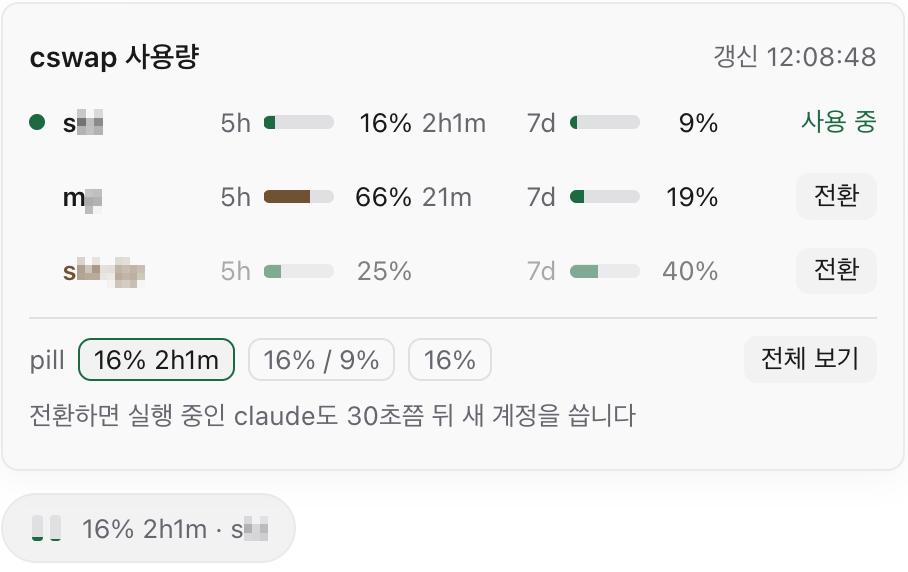

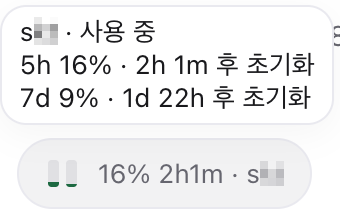
Shows Claude subscription usage for every account you manage with
claude-swap (cswap). A workspace panel lists the
accounts one per line with their 5-hour, 7-day, model-scoped, and extra-spend usage. Agents
on the built-in claude provider, and on providers pinned to one account with cswap run,
get a pill above the chat input with that account's usage. The pill's popover switches the
active account.
On a host without claude-swap, the panel and the pill show the host's default Claude login instead, from the usage Paseo already reads for it.
How it works
The plugin runs cswap list --json on the daemon host and draws what it returns. It reads
no claude-swap files and no credentials, and it makes no network requests of its own. It
asks claude-swap at most once every 60 seconds, and the panel and every pill share that one
answer, because the usage endpoint behind claude-swap allows roughly 28 to 30 requests per
hour for each account.
Setup
- Paseo 0.11.0 or later.
- claude-swap on the daemon host, for the multi-account view. Without it you get the default login only.
cswapis looked up at~/.local/bin/cswap. If it is installed elsewhere, setCSWAP_BINto its absolute path in the environment of the Paseo daemon process.
What you get
- Panel. Open it from the Command Center with "Open cswap usage", or from the new tab
menu. Each row is one account: alias, email, an
activebadge, then one column per usage window with a bar, a percentage, and the time left until it resets. The 7-day columns add a linear estimate of where the window ends up at its reset. Treat it as a rough signal, since bursty usage skews it. The text has three sizes, and the choice is saved for the host. - Composer pill. An agent on the built-in
claudeprovider gets a pill for the account claude-swap is currently on. An agent on a provider that extendsclaudeand launchescswap run <account>gets a pill for that pinned account. The label has three formats, chosen in the popover or on the plugin's settings screen. - Switching. Pressing Switch in the popover runs
cswap switch <number> --json. That changes the active account for the whole machine, so every running Claude agent and terminal on the default login follows it. It is the only command the plugin runs that changes anything, and it runs only when you press the button. - Accounts that need attention. An account claude-swap cannot refresh shows its status,
such as
token_expired, and its last reading dimmed when claude-swap still has one.
What it reads
- The output of
cswap list --json, which includes account emails. Fields the panel does not draw, such as organization names, are dropped on the daemon and never reach the app. None of that output is written to logs. - Paseo's provider configuration, on the daemon only, to find the providers that launch
cswap run <account>. Only the provider id and the account argument are sent to the app. The rest of each provider entry, including anyenvvalues, stays on the daemon. - The
CSWAP_BINenvironment variable. - Paseo's own usage report for Claude, only when claude-swap is not installed.
Limits
- The estimate is empty for about the first day after a 7-day window resets, because claude-swap does not report how far a window has run until then.
- Whether a poll reaches the network is decided by claude-swap, so a reading can be older than 60 seconds.
- Without claude-swap there is no switching, no estimate, and no spend column, and the reading is as fresh as Paseo's own, which Paseo caches for about five minutes.
- A provider that runs
cswap runwith no account argument gets no pill. - The text is in English or Korean, following the system locale.